
I knew going in that it would be painful to build the PMO library into UE5. Once again I found myself in linker hell. But before we get to the problems, let’s look at what I’m trying to do here.
I need my client library to be completely independent of a game engine, meaning it won’t do any rendering. I want to be able to run it headless so I can automate testing and building bots. Also the server / client code will share a ton of ECS systems and components, so I need it to work in both Linux and Windows. As you may recall, I’ve based my game engine off of flecs which, as you can imagine, is a very different design than UE5.
So I need these two systems to interact and play nicely together. The first part of my work was simply building the server/client code. I now need to make sure this will work inside of UE5 where the clients will ultimately be. So, how do we get a third party library into UE5?
When you want to add in a third party library, Epic recommends following the third party plugin template. In UE5.2 you go to Edit -> Plugins and click the + Add button to the left of the search bar. Scroll down to the bottom of the window and you’ll see Third Party Library.
This will create a bunch of boiler plate code for you in the Plugins directory. Inside of Plugins\PMO\Source we have two directories. One is the plugin, and one is the third party library (example) code. I deleted everything in the example code except for the PMOLibrary\PMOLibrary.Build.cs file. This file is what is going to configure our pmo_library.
Getting the code into UE5
The second step is getting pmo repository code into the PMOClient repository. I’ve opted to use git submodules. They are “easy” to keep things in sync between changes I make in the library and the UE client.
Simply running from my Plugins\PMO\Source\ThirdParty directory:
git submodule add git@gitlab.com:wirepair/pmo.git
Will add the pmo submodule into my PMOClient. Whenever I make changes in pmo that I want to pull into UE5, I can run:
git submodule update --remote --merge
I have my code into the client repository now what do I do?
Failed attempt #1 (Static linking)
All of my dependencies are statically linked, and in Linux I plan on keeping the pmo library code (all code in src) statically linked. So my first attempt was to build the PMO library as a statically linked library. In the PMOLibrary.Build.cs you see calls to PublicAdditionalLibraries.Add("...\ExampleLibrary.lib"). Seeing this, I thought, hey I have a .lib, and well, that’s a .lib, this should be easy!
Soon after plugging in the paths correctly, I saw tons of unresolved symbol errors again, so for some reason I thought I’d need to statically link in all my static libraries.
This also did not work, now I started to see:
[2/2] Link [x64] PMOClient.exe
pmo_library.lib(server.obj) : error LNK2038: mismatch detected for 'RuntimeLibrary': value 'MT_StaticRelease' doesn't match value 'MD_DynamicRelease' in SharedPCH.Engine.ShadowErrors.h.obj
pmo_library.lib(cryptor.obj) : error LNK2038: mismatch detected for 'RuntimeLibrary': value 'MT_StaticRelease' doesn't match value 'MD_DynamicRelease' in SharedPCH.Engine.ShadowErrors.h.obj
pmo_library.lib(socket.obj) : error LNK2038: mismatch detected for 'RuntimeLibrary': value 'MT_StaticRelease' doesn't match value 'MD_DynamicRelease' in SharedPCH.Engine.ShadowErrors.h.obj
...
What in the fresh hell is this? What this means is that UE5 expects me to be loading my library dynamically, i.e. as a DLL. Remember the whole /MD /MT garbage? Yeah, it’s back again. Of course I didn’t immediately realize what I needed to do here so I flailed quite a bit duckduckgo’ing and googling my way nowhere.
Finally, I realized what I needed to do:
- Statically link all dependencies into my pmo_library.
- Create a shared library (DLL) for pmo_library in Windows
So, how the hell do I do that?
Attempt #1
In CMake we can tell it to build a shared library by adding the SHARED keyword to the add_library function:
add_library(pmo_library SHARED
  "ecs/movement.cpp"
  "ecs/player.cpp"
  "net/socket.cpp"
  ...
)
Note I was getting tons of new errors as now unresolved symbols in my fmt::fmt library started cropping up. I realized I was missing linker commands for those, added them in and move on.
Keep in mind, this is all very frustrating as I have the same repository in three different directories:
- WSLv2 (Linux) the primary source where I edit/test/run pmo
- My standard windows source directory of pmo to make sure it builds properly
- Inside of the PMOClient repository to make sure UE5 can link/run the client library
I’m having to constantly switch back and forth to make sure it compiles in all circumstances and fix all the little errors that crop up.
Anyways, now armed with my DLL I should be able to run my code!
I update my PMOLibrary.Build.cs:
// Paths for include files
PublicIncludePaths.Add(Path.Combine(ModuleDirectory, "..", "pmo", "build", "_deps", "flatbuffers-src", "include"));
PublicIncludePaths.Add(Path.Combine(ModuleDirectory, "..", "pmo", "third_party", "libsodium-1.0.18", "src", "libsodium", "include"));
PublicIncludePaths.Add(Path.Combine(ModuleDirectory, "..", "pmo", "src"));

PublicDelayLoadDLLs.Add("pmo_library.dll");

RuntimeDependencies.Add("$(PluginDir)/Binaries/ThirdParty/PMOLibrary/Win64/pmo_library.dll");
In my actual plugin code I can now try to load my dll:
`LibraryPath = FPaths::Combine(*BaseDir, TEXT("Source/ThirdParty/pmo/build/src/Release/pmo_library.dll"));`
`ExampleLibraryHandle = !LibraryPath.IsEmpty() ? FPlatformProcess::GetDllHandle(*LibraryPath) : nullptr;`
if (ExampleLibraryHandle)
	{
		auto Crypt = crypto::Cryptor();
    	auto Key1 = Crypt.GenerateKey();
		if (Key1)
		{
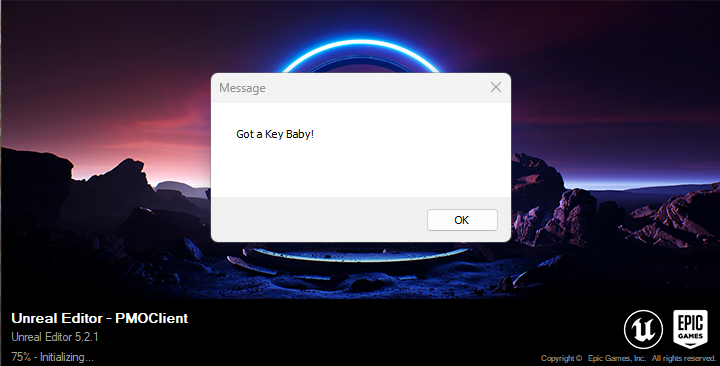
			FMessageDialog::Open(EAppMsgType::Ok, LOCTEXT("ThirdPartyLibraryError", "Got a Key Baby!"));
		}
		else
		{
			FMessageDialog::Open(EAppMsgType::Ok, LOCTEXT("ThirdPartyLibraryError", "Failed to get a key!"));
		}
	}
	else
	{
		FMessageDialog::Open(EAppMsgType::Ok, LOCTEXT("ThirdPartyLibraryError", "Failed to load example third party library"));
	}
Guess what happened?
Unresolved symbol errors. This time in my code, not the libraries I’m linking to. “But of course!” I say, realizing now, how the hell would the compiler know that crypto::Cryptor() was a thing since it’s being linked dynamically?
__declspec(dllexport) and how to do it properly with CMake
If you search around the internets, you’ll see suggestions to add __declspec(dllexport) in front of all symbols you want to export. If you’re like me, you’ll think holy shit this hasn’t changed in the past 20 years?! We STILL have to do this?
Turns out we don’t, at least not without the help from some CMake magic.
Enter CMAKE_WINDOWS_EXPORT_ALL_SYMBOLS:
# Required so we don't have to add dllspec everywhere
set(CMAKE_WINDOWS_EXPORT_ALL_SYMBOLS ON)
This handy little setting will create a .lib for us that we can then link against so UE5 knows about our symbols before we load our dll.
So our pmo Release directory now has two files upon successful build:
- pmo_library.dll
- pmo_library.lib
Back to our PMOLibrary.Build.cs we can add in this .lib to help the linker:
PublicAdditionalLibraries.Add(Path.Combine(ModuleDirectory, "..", "pmo", "build", "src", "Release", "pmo_library.lib"));
Remember all the way back at the beginning of this post I mentioned the call to the ExampleLibrary.lib? That’s what this was. So there’s two types of .lib files, one for static linking, and one for when you are using a DLL.
That’s it! Now I have the header files, the pmo_library as a DLL and all symbols resolved and working.
 a place to jot