

Mission Accomplished
Phew, after a year and a month, I FINALLY have networked movement visible with Unreal Actors in my MMORPG!
As you can see we now have characters moving around and visible in the UE5 editor:
Problems getting here
After my performance / load testing I really wanted to start seeing characters appear in UE5 and move around. Thus began my latest stint of work, wiring everything back into UE5 and getting the client side code working. What I wasn’t planning on was having UE5 crash almost immediately every time I pressed Play.
DLL Boundary Strikes Again
That pesky DLL boundary and memory management was at fault, I was mixing too much of my library code directly into the UE5 Subsystem module. This was causing things to be allocated in the library and released by UE5, leading to crashes in UE5’s FMemory classes. I refactored the client code to only have 3 calls into the PMO library:
/**
 * @brief InitPMOClient returning our player as flecs::entity_t (uint64_t)
 *
 * @param GameWorld
 * @param Log
 * @param Config
 * @param UserId
 * @return flecs::entity_t
 */
flecs::entity_t InitPMOClient(flecs::world &GameWorld, logging::Logger &Log, config::Config &Config, uint32_t UserId);

/**
 * @brief TickPMOClient hides the internals from caller and processes any logic that is handled outside of flecs
 *
 * @param GameWorld
 * @param Player
 * @param Log
 * @param DeltaTime
 */
void TickPMOClient(flecs::world &GameWorld, flecs::entity &Player, logging::Logger &Log, float DeltaTime);

/**
 * @brief DeinitPMO shuts down our world (threads, physics and flecs)
 *
 * @param GameWorld
 */
void DeinitPMO(flecs::world &GameWorld);
Before, I was starting the network threads, creating and importing modules and doing other wild stuff in UE5 causing various things to be allocated by UE5 and not by my library where they belong. By “hiding” all of this inside my library init code and only really allowing flecs to be allocated by UE5 I can (hopefully?) rest assured that UE5 won’t touch my various pmo library objects.
I do however, expose and allocate the flecs world in UE5. In fact it’s created from UE5 in my Subsystem module. This allows me to pass the flecs world directly into my game client (UE5’s GameMode class) from the Subsystem. This is awesome because now I can create client-side only flecs systems and not have to recompile the pmo library everytime.
Creating a NetworkCharacterActor
As you may (or may not!) know, UE5 deals with Actors, things that can be spawned into the world. A common method of dealing with Actors is to create an underlying C++ class for the actor, but then create a Blueprint based off this actor so you can more easily tweak values (without having to recompile.)
I created the NetworkCharacterActor class and then created my new blueprint, BP_NetworkCharacterActor. With this ready, I now needed to spawn it when an event fires in my PMO library. In particular, when the flecs network::Character component is attached to a new entity. This is done in my void PMOWorld::ProcessServerCommand(const Game::Message::ServerCommand *Command) function that processes server command packets:
void PMOWorld::AddNetworkPlayer(const Game::Message::Entity *Entity)
{
	auto Pos = units::Position{Entity->player()->pos()->x(), Entity->player()->pos()->y(), Entity->player()->pos()->z()};
	auto Rot = units::Quat{Entity->player()->rot()->x(), Entity->player()->rot()->y(), Entity->player()->rot()->z(), Entity->player()->rot()->w()};
	Log->Info("Adding new player {}, client at: {} {} {}", Entity->id(), Pos.vec3[0], Pos.vec3[1], Pos.vec3[2]);

	auto NewNetworkPlayer = World.entity()
		.set<network::ServerId>({Entity->id()})
		.set<units::Attributes>({Entity->player()->health()})
		.set<units::Position>({Pos})
		.set<units::Quat>({Rot})
		.set<character::NetworkCharacter>({PhysicsSystem, Pos, Rot, Entity->id()});

	NewNetworkPlayer.add(flecs::ChildOf, Map);
	auto SetRot = NewNetworkPlayer.get<units::Quat>();
	Log->Info("Player Rot: {} {} {} {}", SetRot->vec4[0], SetRot->vec4[1], SetRot->vec4[2], SetRot->vec4[3]);
}
flecs, which is amazing by the way, has an observer method that you can call when certain components are modified, in my case I wanted to be notified of this .set<...> event and spawn the BP_NetworkCharacterActor from my GameModeBase class:
UCLASS(minimalapi)
class APMOClientGameMode : public AGameModeBase
{
	GENERATED_BODY()

public:
	APMOClientGameMode();

	virtual void StartPlay() override;

	void RegisterPMOSystems();

	UPROPERTY(EditAnywhere, BlueprintReadWrite)
	TSubclassOf<ANetworkCharacterActor> CharacterClass;

private:
	TObjectPtr<UPMOSubsystem> PMOSystem;
	TObjectPtr<UWorld> World;
};
Right now my GameMode is very simple, but does a few important things:
- The TSubclassOf object allows me to set a BP class instead of a C++ class to spawn my new Networked Player actor. This is of course provided the blueprint inherits from the NetworkCharacterActor C++ class
- RegisterPMOSystems – this method will create custom flecs systems and observers to handle any event from my pmo library.
In the GameMode’s StartPlay method we get a reference to our PMOSubsystem then call our Registration code:
	PMOSystem = GameInstance->GetSubsystem<UPMOSubsystem>();

	if (!PMOSystem)
	{
		UE_LOG(LogTemp, Error, TEXT("Failed to get PMOSubSystem!"));
		return;
	}
	RegisterPMOSystems();
Now we can access the Flecs world reference and create our observer when the character::NetworkCharacter component is set on any entity in our world:
flecs::world& FlecsWorld = PMOSystem->GetEcsWorld();

FlecsWorld.observer<character::NetworkCharacter>("OnNewNetworkCharacter")
	.event(flecs::OnSet)
	.write<NetworkCharacterRef>()
	.each([&](flecs::iter& It, size_t Index, character::NetworkCharacter& NetCharacter)
	{
		UE_LOG(LogTemp, Warning, TEXT("OnNewNetworkCharacter called!"));
		auto Position = NetCharacter.GetPosition();
		auto FPos = FVector(Position.vec3[0] * 100.f, Position.vec3[2] * 100.f, Position.vec3[1] * 100.f);
		auto Rotation = NetCharacter.GetRotation();
		auto FRot = FQuat{ Rotation.vec4[0], Rotation.vec4[2], Rotation.vec4[1], Rotation.vec4[3] };
		FActorSpawnParameters Params;
		auto AActor = World->SpawnActor<ANetworkCharacterActor>(CharacterClass.Get(), FPos, FRot.Rotator());
		auto NetworkCharacterPlayer = It.entity(Index);
		auto ID = NetworkCharacterPlayer.get<network::ServerId>()->EntityId;
		UE_LOG(LogTemp, Warning, TEXT("OnNewNetworkCharacter Pos: %s Rot: %s ServerId: %d"), *FPos.ToCompactString(), *FRot.ToRotationVector().ToCompactString(), ID);
		NetworkCharacterPlayer.set<NetworkCharacterRef>({ AActor });
	});
Note the .event(flecs::OnSet)! This will be triggered from our AddNetworkPlayer pmo library code.
The above observer will call Unreal’s World->SpawnActor of our actor class, then we create a custom flecs component that will hold the pointer to this actor called NetworkCharacterRef and add it to this newly spawned flecs entity.
struct NetworkCharacterRef
{
	ANetworkCharacterActor* AActor;
};
Now that we can receive events that a network character has connected, we need a system in place to update it’s position and rotation:
FlecsWorld.system<NetworkCharacterRef, units::Position, units::Quat>("UpdateNetCharacters")
	.kind(flecs::PreUpdate)
	.each([&](flecs::iter& It, size_t Index, NetworkCharacterRef &NetActor, units::Position &Pos, units::Quat &Rot)
	{
		FVector FPos{ Pos.vec3[0] * 100.f, Pos.vec3[2] * 100.f, Pos.vec3[1] * 100.f };
		FQuat FRot{ Rot.vec4[0], Rot.vec4[2], Rot.vec4[1], Rot.vec4[3] };
		auto NetworkCharacterPlayer = It.entity(Index);
		auto ID = NetworkCharacterPlayer.get<network::ServerId>()->EntityId;
		UE_LOG(LogTemp, Warning, TEXT("UpdateNetCharacters called NewPos: %s! %d"), *FPos.ToCompactString(), ID);
		NetActor.AActor->SetActorLocationAndRotation(FPos, FRot);
	});
After that was implemented, I started my game, connected to the server, and while I could see my character show up, for some reason it wasn’t moving around. Even though I created a system to handle it’s units::Position and units::Quat components being updated!
To investigate why the UpdateNetCharacters system wasn’t being called, I was finally able to take advantage of flecs awesome explorer tooling. This can easily be turned on by calling the following:
// https://www.flecs.dev/explorer
ECSWorld->set<flecs::Rest>({});
That’s it, that sets up your world to be explored to the flecs explorer tool, which is just a website you can load after starting your game, which looks like this:
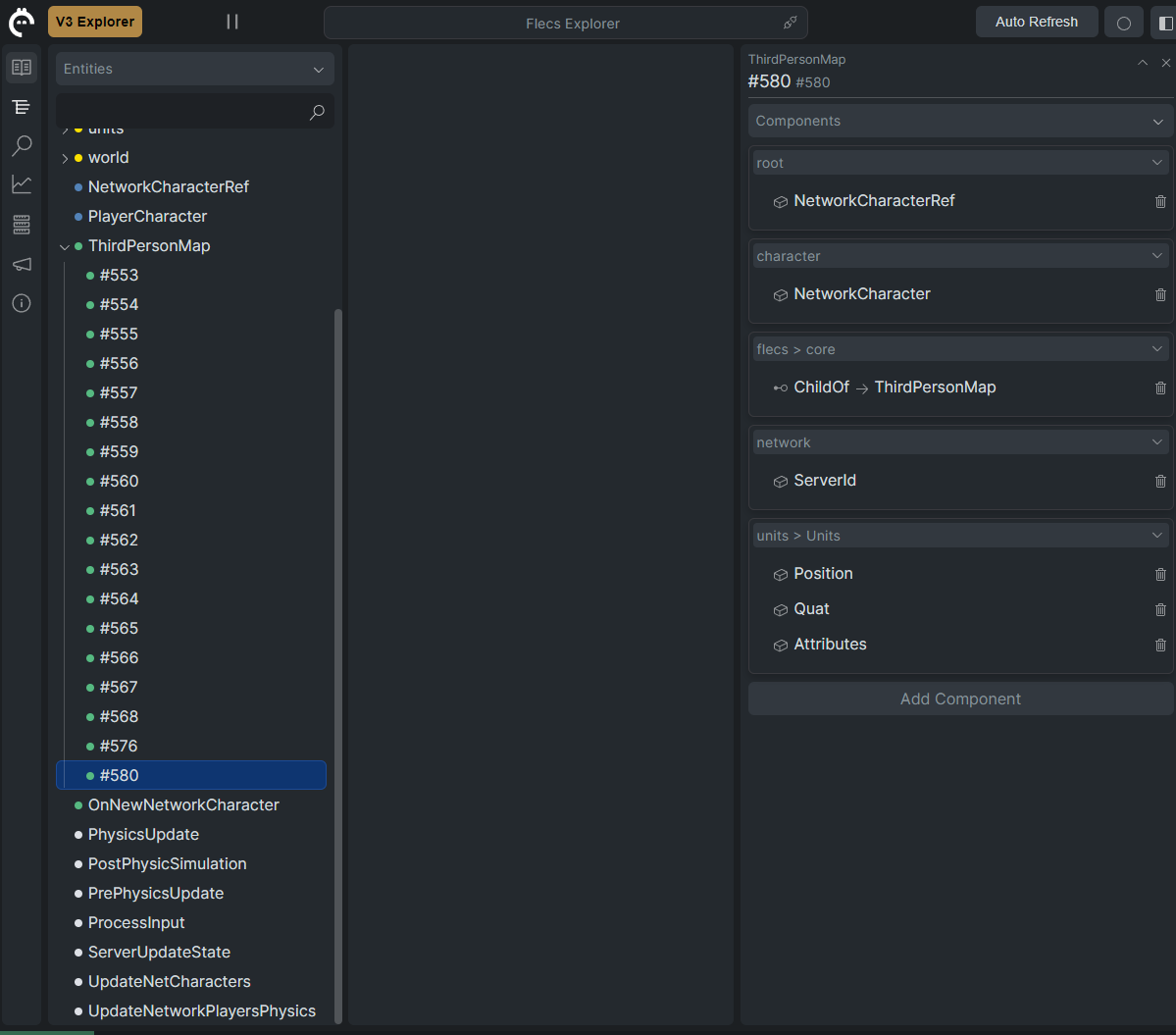
Here we have a full list of our entities and systems in place. You’ll note this #580 entity has the units > Units components Position and Quat. This is the fixed version (I forgot to take a screen shot of when it was broken). But I found out from this view that the NetworkCharacterRef entity was missing the Quat component.
If it doesn’t have the exact same set of components then the system FlecsWorld.system<NetworkCharacterRef, units::Position, units::Quat> would never be called. It turns out I accidentally copied the pmo_library.dll files to an old directory (the Plugins/Binaries/ path) instead of the /Binaries/Win64/) path. After updating my CMake file:
if (MSVC)
    if(CMAKE_BUILD_TYPE MATCHES Debug)
        # ...
    else()
        set(UE5BINDIR "${PROJECT_SOURCE_DIR}/../../../../../Binaries/Win64/")
        set(APPOUTDIR "${PROJECT_SOURCE_DIR}/build/apps/Release/")
        set(OUTPUTDIR "${PROJECT_SOURCE_DIR}/build/Release/")
        set(FLECSDLL "${PROJECT_SOURCE_DIR}/build/_deps/flecs-build/Release/flecs.dll")
        set(FMTDLL "${PROJECT_SOURCE_DIR}/build/_deps/fmt-build/bin/Release/fmt.dll")
        set(JOLTLIBDLL "${PROJECT_SOURCE_DIR}/build/_deps/jolt-build/Release/Jolt.dll")
        set(PMOLIBSDLL "${PROJECT_SOURCE_DIR}/build/src/Release/pmo_library.dll")
    endif()
    # ...

    # Also copy files to our UE5 Binaries directory
    add_custom_command(
      TARGET pmoserver
      POST_BUILD
      COMMAND ${CMAKE_COMMAND} -E copy ${JOLTLIBDLL} "${UE5BINDIR}/Jolt.dll"
      COMMAND ${CMAKE_COMMAND} -E copy ${FLECSDLL} "${UE5BINDIR}/flecs.dll"
      COMMAND ${CMAKE_COMMAND} -E copy ${FMTDLL} "${UE5BINDIR}/fmt.dll"
      COMMAND ${CMAKE_COMMAND} -E copy ${PMOLIBSDLL} "${UE5BINDIR}/pmo_library.dll"
  )
endif()
the files were properly copied over and we could now see other players moving!
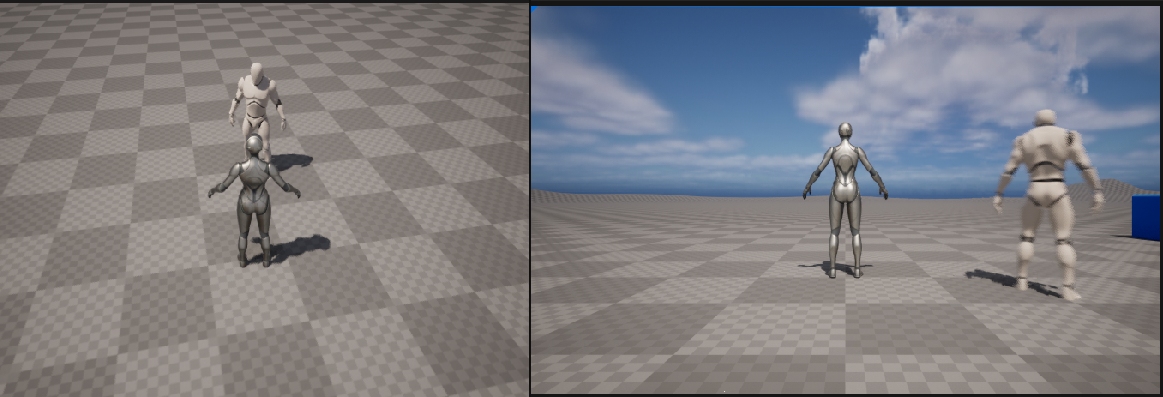
With this part complete, I now want to fix the characters animations. This will allow me to take advantage of UE5s awesome animation blueprints, but since I’m hijacking the character (and network actor) I will definitely need to figure out how to get this working! Wish me luck.
 a place to jot