
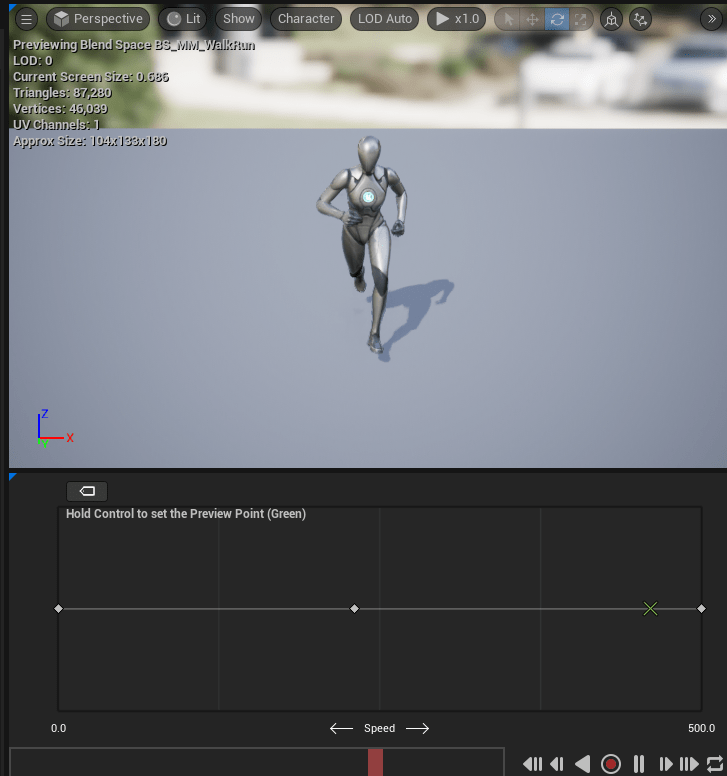
Hey folks, back after a slight break (trip) but I have been getting back into things here by fixing my animations and getting them to work for the network character(s). Let’s dive in.
As you may recall we left off with our character able to run around with the default animation blueprint all wired up. However, our network characters were just zooming around with no such ability.
The whole point of using animation blueprints is that they can be shared across different character types, and to this point I wanted to make one work for all my characters.
I accomplished this by doing a few things, and having to make some changes.
Velocity
I was planning on only sending Location & Rotation for entities and then calculating velocity locally, but I don’t really know if this is a good idea so I opt’d to simply send velocity from the server. This required changes to my entities:
table PlayerEntity {
  health:float; // 4 bytes
  actions:[ActionType]; // 2 * N bytes
  items:[uint16]; // 2 * 9 bytes // each index is an item slot starting from 0 being the head, shoulders, arms, hands, ring left, ring right, neck, left hand, right hand
  pos:Vec3; // 12 bytes
  vel:Vec3; // 12 bytes <--- boo more data
  rot:Quat4; // 16 bytes
}
I then had to update all my various systems and flat buffer serialization code to account for collecting / updating and sending the velocity vector. This has the unfortunate effect of adding an additional 12 bytes per network message (provided the entity is moving or has a change in value).
Now that my NetworkCharacterActor has a velocity value, I can update the Actor’s MovementComponent with the velocity so the Animation Blueprint can read the value.
UMovementComponent
I’ve made both the local player character and network characters inherit from the base ACharacter class. Technically, the network character probably doesn’t need to do this, we could probably get away with a normal actor with a UMovementComponent applied to it.
While the local character overrides input handling and other features, my NetworkCharacterActor doesn’t need to do as much. We only really have a single Update call where we set the characters location/rotation and velocity.
void ANetworkCharacterActor::Update(FVector &Position, FVector &Velocity, FQuat &Rotation)
{
	SetActorLocationAndRotation(Position, Rotation);
	auto Movement = Cast<UPMONetworkMovementComponent>(GetCharacterMovement());
	if (!Movement)
	{
		return;
	}
	Movement->Velocity = Velocity;
	Movement->UpdateComponentVelocity();
}
This update call is called every packet update we get from our GameMode flecs system:
FlecsWorld.system<NetworkCharacterRef, units::Position, units::Velocity, units::Quat>("UpdateNetCharacters")
		.kind(flecs::PreUpdate)
		.each([&](flecs::iter& It, size_t Index, NetworkCharacterRef &NetActor, units::Position &Pos, units::Velocity &Vel, units::Quat &Rot)
		{

			FVector FPos = PMOConverters::PositionToFVector(Pos);
			FVector FVel = PMOConverters::VelocityToFVector(Vel);
			FQuat FRot = PMOConverters::QuatToFQuat(Rot);

			auto NetworkCharacterPlayer = It.entity(Index);
			auto ServerId = NetworkCharacterPlayer.get<network::ServerId>()->EntityId;
			UE_LOG(LogTemp, Warning, TEXT("UpdateNetCharacters called NewPos: %s NewVel: %s NewRot: %s %d"), *FPos.ToCompactString(), *FVel.ToCompactString(), *FRot.ToString(), ServerId);
			NetActor.AActor->Update(FPos, FVel, FRot);
		});
Going forward I’ll probably need to ensure this system is only updating if we get new data, since there maybe dropped packets in between flecs system calls. Then do some network prediction to move the character(s) forward if we are missing data. But for now testing locally, everything works just fine.
So our NetworkCharacterActor now has velocity and a movement component, meaning we can reuse our default animation blueprint!
Fixing some other small things
I noticed during testing my NetworkCharacterActor rotations seemed… off. Turned out the rotation was wrong in local space, so I simply adjusted it to what Jolt expects, the Z rotation to be -90:

Now my character moves around correctly and rotates the proper direction, but for some reason my local character was walking instead of running, even though viewing it from the networkactor standpoint it was clearly running.
Some how (I have no idea why) but the Velocity call was returning the local characters location in world space, meaning the further away I got from the origin point, it would start the running animation, the closer I got to the origin point, it would play the walking animation.
This is strange because looking over my code I never set the velocity anywhere. To fix this, I just.. well set the Velocity property in the Character’s MovementComponent:
void UPMOMovementComponent::TickComponent(float DeltaTime, ELevelTick TickType, FActorComponentTickFunction* ThisTickFunction)
{
	Super::TickComponent(DeltaTime, TickType, ThisTickFunction);

	if (!PMOSystem)
	{
		return;
	}
	auto Player = Cast<APMOClientCharacter>(this->GetOwner());

	if (!Player)
	{
		UE_LOG(LogTemp, Warning, TEXT("Failed to get Player from MovementComponent"));
		return;
	}

	auto Location = PMOSystem->GetPlayerLocation();
	auto Rotation = PMOSystem->GetPlayerRotation();

	Velocity = PMOSystem->GetPlayerVelocity();
	UpdateComponentVelocity();

	Player->SetActorLocationAndRotation(Location, Rotation);
	LastLocation = Location;
	LastRotation = Rotation;
}
This worked! and my character was finally running locally once the velocity value got up high enough. Until I pressed ‘Jump’, then my game crashed.
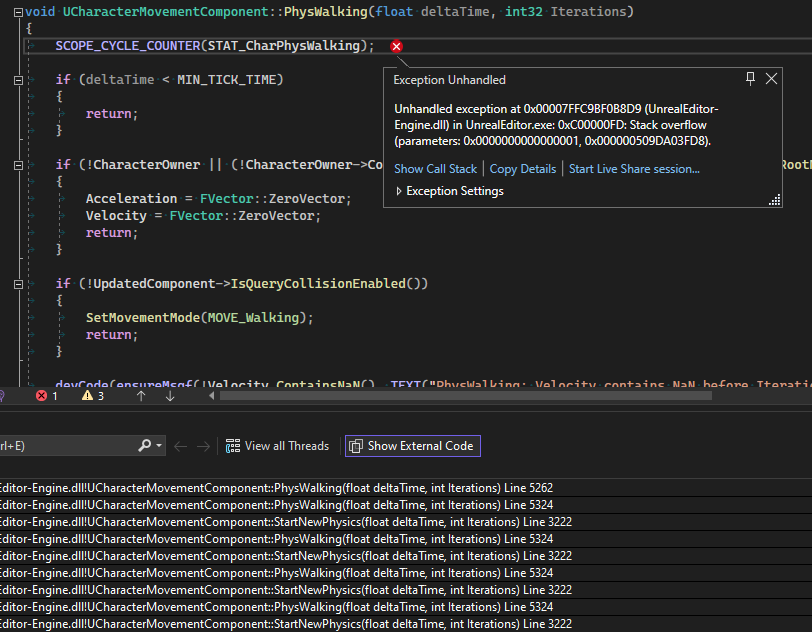
The problem is UE still thinks it has control over my character, so it’s trying to do physics “stuff” with it. This is partly because of how I am hijacking the character and MovementComponent even though everything is being “driven” by Jolt’s physics.
Thankfully the fix is super simple, I just override the StartNewPhysics method to do, well, Nothing:
/** We don't want UE5 physics to do anything here so just do nothing */
virtual void StartNewPhysics(float deltaTime, int32 Iterations) override {};
Yay inheritance.
There’s probably a few more methods I could override to ensure that UE doesn’t try to apply physics to my characters, I’ll override them as I go. But doing this fixed my problem and I no longer crash when the character jumps!
So with that out of the way, I can actually start working on some game play stuff! I’m super excited to start working on two things builds & combat. The goal is to have a build and combat system ready to go in the next 8-10 months. I would love to be able to setup a 3v3 or 5v5 match by the time I’m done with it.
Here’s hoping I can reach that milestone! But for now, it’s time to start thinking about character builds. To this end, I’ve recruited my friend to assist me and designing some systems to play around with. Will update here as we make progress!
 a place to jot