
I have been working on client rollback physics for ~ checks notes ~ THREE months now. I have never worked on the same problem for this long. I finally made a semi-small breakthrough this weekend, only to be hit with another problem. Before we get into the details of what I’ve done, let’s cover some of the variables at play.
Servers, Clients, Timing & Physics
I had no idea how many variables are in play when dealing with netcode and physics. Let’s create a list of things that we have to account for:
- Server processing time – How often/quickly is the server processing client packets and sending out updates
- Client processing time – How often/quickly the client is sending out packets and receiving updates from the server
- UDP – UDP is not reliable, you have no guarantee that a packet is sent will arrive on time or in order, or at all. On top of that, you have no idea when the kernel or OS will send your packets out
- Fixed timesteps – Physics needs to be run at a fixed timestep (in my case 30 fps or 33ms) on both clients and servers, otherwise we will not have deterministic simulations
- Acknowledgements/Sequence IDs – We need to track which packets the server/clients saw last, and what sequence they are currently processing
- Client & Server states, on the client – The client needs to track what states it’s processed, and what states the server has sent to us. This includes inputs, locations, rotations, velocity and anything else that can impact the simulations
- Timelines – You have to split your mind in two, thinking about the servers state of the world, as well as the client(s). Do not underestimate how much this can confuse you
For the past two months I’ve been mainly focusing on the problem(s) presented in 1 through 4. It wasn’t until last week I went back and re-read some old Gaffer on Games material and Gabriel Gambetta’s work. It finally clicked that I needed a jitter buffer.
Up until then, I had been processing the clients packets on the server as they came in. This meant if I got any client packets slightly delayed from my game loops very consistent tick rate, I would miss some player inputs. Miss an input, and your simulations are now wrong as the velocity/positions/rotations would be different. The server and client will be desynchronized at that particular frame/sequence ID since the client simulated the frame with the input, and the server without it.
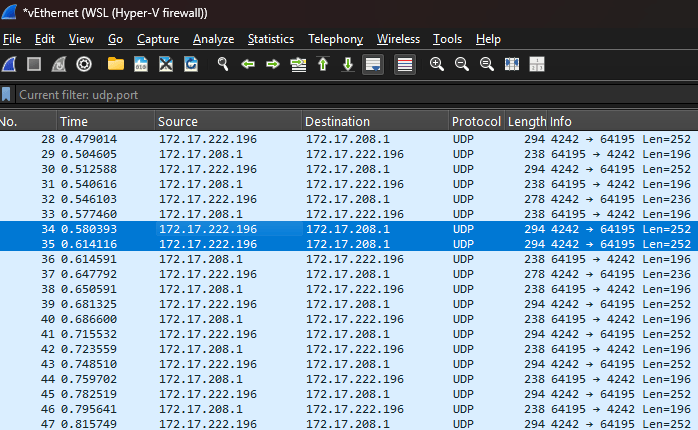
Running the client & server on the same WSLv2 Linux host did not exhibit this problem, because the timings of my packets were always synchronized with the tick rate. Once I moved my client code to windows… I started to see packets being sent at very inconsistent rates. Some ticks I’d receive 2, some I’d receive none.
So what is is a Jitter buffer? It’s really just a queue where we can build up a few packets worth of data ahead of time before we start actually processing them, in the servers case we wait four frames worth of inputs/data from the client. The client waits for four “world updates” from the server. After we get these four updates, we set the buffer to “ready” and start actually processing the data from the jitter queue.
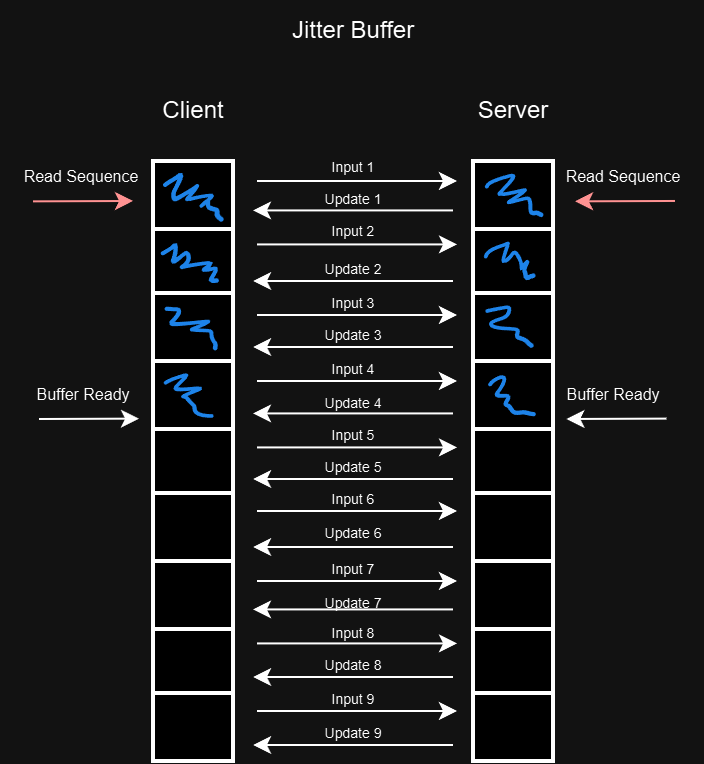
Figure 1: Once buffer is ready, clients and servers start reading the actual inputs and updates.
While this some what works, an interesting problem occurs in my design since I’m not acknowledging any of these inputs or updates UNTIL I start processing them. After around 6-7 packets (buffer ready + normal latency between client/server) the server starts to see the player inputs. However, the client was processing those inputs 7 ticks ago, meaning we immediately desync. Server thinks we haven’t moved, client has already started moving. I semi-cheat here and don’t even attempt to check for desync’s until the jitter buffer is completely full (24 packets).
Once the buffer is full, I start looking for desyncs, which is done during processing world updates:
auto ServerState = Player.get_mut<network::ServerStateBuffer>();
auto ClientState = Player.get<network::ClientStateBuffer>();

// Update our last known server state ack id, to be sent in next input packet
ServerState->SetSequenceId(SequenceId);

// determine if server and client mismatched
auto PastPos = ClientState->State.PositionAt(LastClientAckId);
auto PastRot = ClientState->State.RotationAt(LastClientAckId);
auto PastVel = ClientState->State.VelocityAt(LastClientAckId);

auto ServerPos = ServerState->State.PositionAt(SequenceId);
auto ServerRot = ServerState->State.RotationAt(SequenceId);
auto ServerVel = ServerState->State.VelocityAt(SequenceId);

if (PastPos != ServerPos || PastRot != ServerRot || PastVel != ServerVel)
{
	Player.set<network::PhysicsDesynced>({SequenceId, LastClientAckId});
}
It took me a long while to realize exactly which sequence IDs I need to track (server? client? last ack id?). But it seems obvious in hindsight. We need the server to tell us which client ack id it was processing when it finalized it’s simulation. So we take the client state at the LastClientAckId (this ack id comes from the server in every world update packet) and compare that to what the server just sent us at it’s Sequence Id.
We then compare all the fields necessary (do not just compare position!). If they don’t match, I set a network::PhysicsDesynced component on the player so that our physics systems can pick it up and rollback the client.
Rolling back physics
Saving Physics State
Before we can roll physics back, we first need to capture states. For that we use JoltPhysics’ built in state recorder and only record active bodies.
struct State
{
	std::array<JPH::StateRecorderImpl, 24> Physics{};
};
/**
 * @brief Determines which physics bodies to record state for
 *
 */
class StateSaverFilter : public JPH::StateRecorderFilter
{
public:
	virtual bool ShouldSaveBody(const JPH::Body &InBody) const override
	{
		if (!InBody.IsActive() || InBody.IsStatic())
		{
			return false;
		}
		return true;
	}
}
We create a flecs system to run at the end of the tick, passing in our state buffer to Jolt’s PhysicsSystems’ SaveState method.
GameWorld.system<physics::State, character::PMOCharacter, network::ClientStateBuffer>("OnSavePhysicsState")
	.kind(flecs::PreStore)
	.each([&](flecs::iter& It, size_t Index, physics::State &PhysicsState, character::PMOCharacter &Character, network::ClientStateBuffer &ClientState)
	{
		auto SeqId = ClientState.State.SequenceId;
		PhysicsState.Physics.at(SeqId).Clear();
		System->SaveState(PhysicsState.Physics.at(SeqId), JPH::EStateRecorderState::All, &StateFilter);
	});
Rolling it back
Rolling back is a bit of an involved process. The full code is here but we’ll break it into small sections for this post.
// the rollback flecs system
GameWorld.system(...)
{
	auto Player = It.entity(Index);
	auto &State = PhysicsState.Physics.at(Desynch.LastAckdClientId);
	State.Rewind();

	auto OriginalPos = Character.GetPosition();
	auto OriginalRot = Character.GetRotation();

	if (!System->RestoreState(State))
	{
		Log->Warn("failed to restore PhysicsState!");
		return;
	}
	// ... rest of code ...
}
First we pull out the state at the last acknowledged client ID, and rewind our state to that point. We then call the Physics’ system’s RestoreState method, which resets everything in our world back to that point.
We now need to take what the server sees and apply that to our LastAckdClientID+1 sequence:
// Teleport the player back to where the server see's us so we can restart simulation from that frame +1
auto ServerSeqId = Desynch.SequenceId;
auto ServerPosition = ServerState.State.PositionAt(ServerSeqId);
auto ServerRotation = ServerState.State.RotationAt(ServerSeqId);
auto ServerVelocity = ServerState.State.VelocityAt(ServerSeqId);

Character.SetLocation(ServerPosition);
Character.SetRotation(ServerRotation);
Character.SetVelocity(ServerVelocity);
We apply what the server sees to our client’s character. Now we have a ground truth that both the client & server agree on (because the server told us where we are and what we are doing).
We want to check the “distance” between where the client currently is (current sequence ID), and where that last acknowledge ID was so we can know how many steps to re-simulate. Next, we need to overwrite the old client state data with the servers information.
uint8_t Distance = std::abs(ClientState.State.SequenceId - Desynch.LastAckdClientId + network::MaxSequenceId) % network::MaxSequenceId;

ClientState.State.SequenceId = Desynch.LastAckdClientId;
ClientState.State.AddStates(ServerPosition, ServerVelocity, ServerRotation);
ClientState.State.Inc();
We then and then reset our client state to that last acknowledge id and set it’s SequenceId to it as well. Finally, we increment by one, to prepare for the re-simulation.
// Just incase copy our inputs as we are going to overwrite them as we replay each step.
std::array<network::Inputs, network::MaxSequenceId> CopyInputs = ClientState.Inputs;

for (size_t i = 1; i < Distance; i++)
{
	auto ReplaySeqId = (Desynch.LastAckdClientId+i) % network::MaxSequenceId;
	auto Inputs = CopyInputs.at(ReplaySeqId);
	Character.CharacterController->DesiredVelocity = ClientState.DesiredVelocityAt(ReplaySeqId);

	character::ProcessUserInput(Log, Character, Inputs);

	Character.PrePhysicsUpdate(Allocator);

	System->Update(DeltaTime, CollisionSteps, Allocator, JobThreadPool);
}

// remove now that we've replayed
Player.remove<network::PhysicsDesynced>();
This is the final step, and it is very crucial the order is correct and ALL variables that can affect the simulation are accounted for.
Starting from LastAckdClientId+1 (as we already set what the server saw us at LastAckdClientId) we do the following for Distance number of steps:
- Extract the Inputs from our copied input buffer at the sequence id we are currently replaying at
- Set the Character’s Desired velocity (this comes from the resultant calculations from player input, but before we actually “apply” them in the
PhysicsSystem->Update(...)call.) This will be used as an input alongside data from the next step - Process the input from the replay’d ID
- Call PrePhysicsUpdate
- Call the physics system update method.
We have now re-simulated using the servers data as our originating data and recalculated the rest up until where we were. We can now remove the network::PhysicsDesynced component as we are done.
At last! I finally thought I had everything working. I watch as the next 100 packets fly by with no “Client Desynch’d!” error messages… until around the 122nd packet…
[warning] PreFrame: Error server/client don't match (distance 6) (Serv: 21 time 3938, Client: 3) DesyncAt: 3 LastClientAck: 4
[warning] PreFrame: Desynched Client Pos: 14.857136 -1.0000001 12.505043
[warning] PreFrame: Desynched Server Pos: 15.120983 -1.0000001 15.68312
[info] flecs::OnLoad Rewinding player state from 21 to last client seq seen: 4 (distance: 23) Server Seq: 21 Client Seq: 5
This is super weird. Why is the distance so large, 23 frames worth? My state buffer is only 24! To correlate what’s happening, I go and look at what the server is seeing at the 3938th time mark. (P.S. Absolutely include timing information into your packets for debugging!)
Before we look at the logs I should mention how my client test code works. Once our buffer is ready and the player character is on the ground, we move forward every tick as well as change our yaw angle by 1. This makes it easy to see what inputs should be expected in various packets.
Here’s what the server saw directly BEFORE that point:
(ReadSeq: 111) Current SeqId: 20 Got player ack for ServerSeqId: 9 ClientAck: 15 ClientTime: 3924
PreUpdate: ProcessInput: SeqId: 20 Yaw: 93 Pitch: 0 KeyPress: 1
Here’s what the server saw at the point we desynch’d:
(ReadSeq: 112) Current SeqId: 21 Got player ack for ServerSeqId: 22 ClientAck: 4 ClientTime: 3535
PreUpdate: ProcessInput: SeqId: 21 Yaw: 82 Pitch: 0 KeyPress: 1
Our yaw should be going up, not down?? Also the timestamp is in the past! After some serious head scratching, and making sure my jitter buffer calcuations are correct (they store up to 24 packets with an initial “lead” of 4 frames which is our BufferReady flag). I realized what was happening…
The windows client was, every tick, just slightly sending packets outside of 33ms (some times 34ms, sometimes 35ms). Over time this drift leads to a point where the server wraps around and starts reading old data.
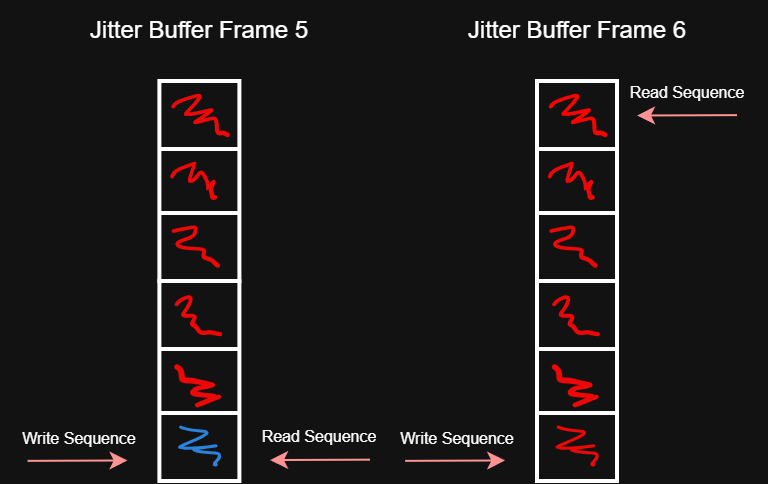
Figure 2: Server’s jitter buffer where red cells are processed data, and blue are new.
Read sequence should be about 4 ticks behind sequence write, but over time with windows clients slightly missing the 33ms mark for sending out packets, it drifts to a point where the read sequence catches up and exceeds the write sequence. That next tick, everything blows up as we are still waiting for a packet from the client but the server rotated back to the first element in the array, expecting new packets to process but instead getting old ones).
Just when I thought I was done with this netcode/rollback stuff…
Griping about my problems on Mastodon lead June of Redpoint Games to point out I probably need to make my client’s send rates adjustable. She was also kind enough to point to some code for me to read (guess what I’m doing this vacation!) So I guess that will be my next endeavor!
Odds & Ends
- For debugging these types of issues I highly recommend sending server time/client time, results of client simulations, and a ton of extra stuff you can cut out later. It just makes correlating soo much easier.
I spent a ridiculous amount of time looking at buffers and logs like this:
[2025-03-22 13:01:26.758] [test] [info] PreFrame: OnProcessUpdate ServerOpCode_Update 21 ServerTime: 3938 Buf 117
[2025-03-22 13:01:26.758] [test] [info] PreFrame: Processing ServerUpdate Sequence 21 Server Time: 3938 Client AckId: 4
[2025-03-22 13:01:26.758] [test] [debug] PreFrame: Server Sees client at: 15.120983 -1.0000001 15.68312 for SeqId: 21
[2025-03-22 13:01:26.758] [test] [info] ============ server =============
[2025-03-22 13:01:26.758] [test] [info] seq 0: Pos: 14.237905 -1.0000001 10.19335	Rot 0 0.59482276 0 0.80385685	Vel: 2.7306166 -0.327 7.504042
[2025-03-22 13:01:26.758] [test] [info] seq 1: Pos: 14.324546 -1 10.445035	Rot 0 0.601815 0 0.79863554	Vel: 2.5992372 -0.327 7.550555
[2025-03-22 13:01:26.758] [test] [info] seq 2: Pos: 14.406781 -1 10.698194	Rot 0 0.6087614 0 0.7933533	Vel: 2.467066 -0.327 7.5947676
[2025-03-22 13:01:26.758] [test] [info] seq 3: Pos: 14.484586 -1 10.952749	Rot 0 0.6156615 0 0.7880107	Vel: 2.3341434 -0.327 7.636667
[2025-03-22 13:01:26.758] [test] [info] seq 4: Pos: 14.557936 -1 11.208624	Rot 0 0.62251467 0 0.78260815	Vel: 2.2005095 -0.327 7.67624
[2025-03-22 13:01:26.758] [test] [info] seq 5: Pos: 14.626809 -1.0000001 11.465739	Rot 0 0.6293204 0 0.777146	Vel: 2.0662053 -0.327 7.713475
...
[2025-03-22 13:01:26.758] [test] [info] ============ client =============
[2025-03-22 13:01:26.758] [test] [info] seq 0: Pos: 14.902962 -0.99999994 17.80154	Rot 0 0.777146 0 0.6293204	Vel: -1.2497807 -0.327 7.8870115
[2025-03-22 13:01:26.758] [test] [info] seq 1: Pos: 14.856721 -1 18.063673	Rot 0 0.78260815 0 0.62251467	Vel: -1.3872375 -0.327 7.8639984
[2025-03-22 13:01:26.758] [test] [info] seq 2: Pos: 14.805912 -1 18.324959	Rot 0 0.7880107 0 0.6156615	Vel: -1.524272 -0.327 7.83859
[2025-03-22 13:01:26.758] [test] [info] *seq 3: Pos: 14.806366 -1 12.24375	Rot 0 0.64944804 0 0.76040596	Vel: 1.6596816 -0.327 7.8110414
[2025-03-22 13:01:26.758] [test] [info] seq 4: Pos: 14.857136 -1.0000001 12.505043	Rot 0 0.656059 0 0.7547096	Vel: 1.5231075 -0.327 7.8388176
[2025-03-22 13:01:26.758] [test] [info] seq 5: Pos: 14.903338 -1 12.767183	Rot 0 0.66262007 0 0.7489557	Vel: 1.3860693 -0.327 7.8642054
...
[2025-03-22 13:01:26.758] [test] [warning] PreFrame: Error server/client don't match (distance 6) (Serv: 21 time 3938, Client: 3) DesyncAt: 3 LastClientAck: 4
[2025-03-22 13:01:26.758] [test] [warning] PreFrame: Desynched Client Pos: 14.857136 -1.0000001 12.505043
[2025-03-22 13:01:26.758] [test] [warning] PreFrame: Desynched Server Pos: 15.120983 -1.0000001 15.68312
- Use wireshark to see how and when packets are actually being sent by your OS, it may surprise you!
- Break the problem down into small variables, as small as you can. For example, I disabled running the rollback while I tracked down all the network issues. At first I didn’t do this and was just fighting with too many systems being wrong it was hard to know where problems were. (And oh boy and there was a lot with my code).
- Test your client/servers on different systems as best as you can. I actually didn’t get ANY desyncs when the client/server were running on the same host because I didn’t see any of those packet send rate drift problems.
- I still need to implement a network simulator (so I can play with packet loss/jitter etc), I will do this once I start working on client smoothing.
- Gripe about your problems on social media and people may have the answer or at least directions for you to look into!
And now… onto building a dynamically adjustable client send rate!
 a place to jot