

Hey folks, this will be a quick post on getting some features into the UI system that took me a minute to figure out, recording here as I’ll probably need to look up how to do this again in the future.
Let’s start with TileView
The UTileView is a UMG object that is highly performant for adding lots of widgets where only a few of them will be displayed at a time, like an inventory system. It took me quite a few hours to get this to work properly because I’m a bonehead and didn’t read the documentation on how to work with it.
UTileViews are configured with a class type of the widget you want to add, in my case a UInventoryItem. My UInventoryWindow handles adding these widget instances to it.
void UInventoryWindow::AddItem(UObject *Item)
{
	if (IsValid(InventoryTileView))
	{
		UE_LOG(LogTemp, Warning, TEXT("Adding inventory item"));
		InventoryTileView->AddItem(Item);
	}
}
Quite straightforward I thought! I just create some widgets, call my inventory window.AddItem and move on with life!
Except nope, the texture I set in my Item before adding it to the TileView wasn’t rendering. At first I thought my texture loading was broken, so I built the following blueprint nodes to trigger when I press a key:
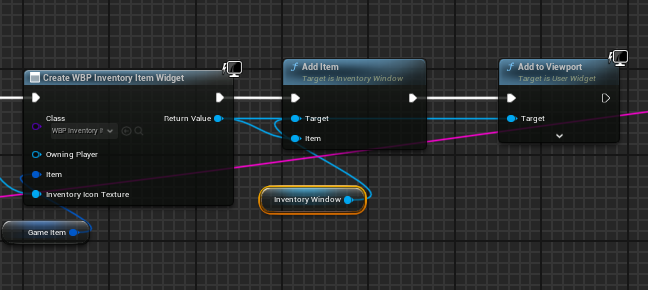
I added the “Add to Viewport” node to visualize in my PlayerHUD to make sure the texture was actually loading properly, and surprise, it was.
Quick aside, you’ll see I can pass the Item and Inventory Icon Texture on the Create Widget, I am able to do this due to passing ExposeOnSpawn = true as a UPROPERTY() setting:
UPROPERTY(EditAnywhere, BlueprintReadWrite, meta = (ExposeOnSpawn = true))
TObjectPtr<UTexture2D> InventoryIconTexture;
I have noticed that occassionally none of my DataTable data loads properly. My textures are coming from a DataTable, and I noticed that unless I reimport the DataTable in the editor nothing works! I check for and see an error when this happens in my custom GameInstance:
void UPMOGameInstance::OnStart()
{
	Super::OnStart();
	if (!Weapons.IsValid())
	{
		UE_LOG(LogTemp, Error, TEXT("Weapons data not set, make sure to set in blueprint!"));
		return;
	}
}
For some reason reimporting it causes everything to work again. If anyone knows why I have to reimport everyonce in a while please reach out!
Back to the problem at hand, I tried adding the item, then calling SetItem in my UInventoryItem class, I also tried calling SetItem then adding. I also tried InventoryIcon->SetBrushFromTexture(InventoryIconTexture); as well as creating a custom brush from a texture then calling SetBrush and nothing seemed to work.
After trying all sorts of hacks to get my texture to work in TileView, I asked in the Unreal Garden discord for help, and someone mentioned that the TileView is virtualized and you have to actually set the Brush / Properties after you add it.
What this really means is I had to properly implement a method from the IUserObjectListEntry,
virtual void NativeOnListItemObjectSet(UObject* ListItemObject) override;
and not just inherit from it and expect things to work. This is where reading documentation would have helped :).
This method is called once the item is added to the TileView. UMG event handling passes in the ListItemObject (which is the UInventoryItem I AddItem’d). I need to extract the properties from that instance and set them on this newly created instance:
void UInventoryItem::NativeOnListItemObjectSet(UObject* ListItemObject)
{
	auto ListItem = Cast<UInventoryItem>(ListItemObject);
	Item = ListItem->Item;
	InventoryIconTexture = ListItem->InventoryIconTexture;
	ButtonBorder = ListItem->ButtonBorder;
	ListItem->UpdateBrush();
}

void UInventoryItem::UpdateBrush()
{
	InventoryIcon->SetBrushFromTexture(InventoryIconTexture);
	InventoryIcon->SetVisibility(ESlateVisibility::Visible);
}
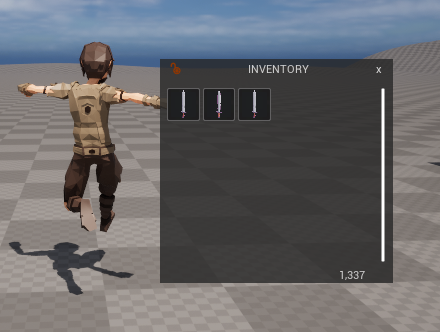
And viola! We now have items added to our inventory tileview!
Handling Double Click
This one came as a surprise to me, UButton has no double click event! If you search the web you see people jumping through hoops setting custom timers/delays to mimic double click events. I almost went down this route until I wondered if other UserWidget’s had double click functionality built in.
Turns out yes, yes they do. In particular the UBorder has OnMouseDoubleClickEvent. So I deleted my InventoryButton and configured the Border to handle double clicks in the Initialize code:
bool UInventoryItem::Initialize()
{
	if (!Super::Initialize())
	{
		return false;
	}

	if (ButtonBorder)
	{
		ButtonBorder->OnMouseDoubleClickEvent.BindDynamic(this, &ThisClass::HandleDoubleClicked);
	}
	return true;
}

FEventReply UInventoryItem::HandleDoubleClicked(FGeometry MyGeometry, const FPointerEvent& MouseEvent)
{
	UE_LOG(LogTemp, Warning, TEXT("UInventoryItem Double Clicked!"));
	return FEventReply(false);
}
From here I’ll configure double click events to check the item type, and see if it’s an equippable item or not. If it is, it will automatically equip it.
After that I’ll need to also configure drag & drop from the tile view, something I definitely think will be complicated and I’m not looking forward to. Then finally I need to add a custom tool tip modal when hovering over items to get their stats.
Once those three features are done I’ll have a pretty decent inventory and equipment setup and I can make sure it works with my flecs code (which does the actual business logic of handling equipment/items).
 a place to jot