
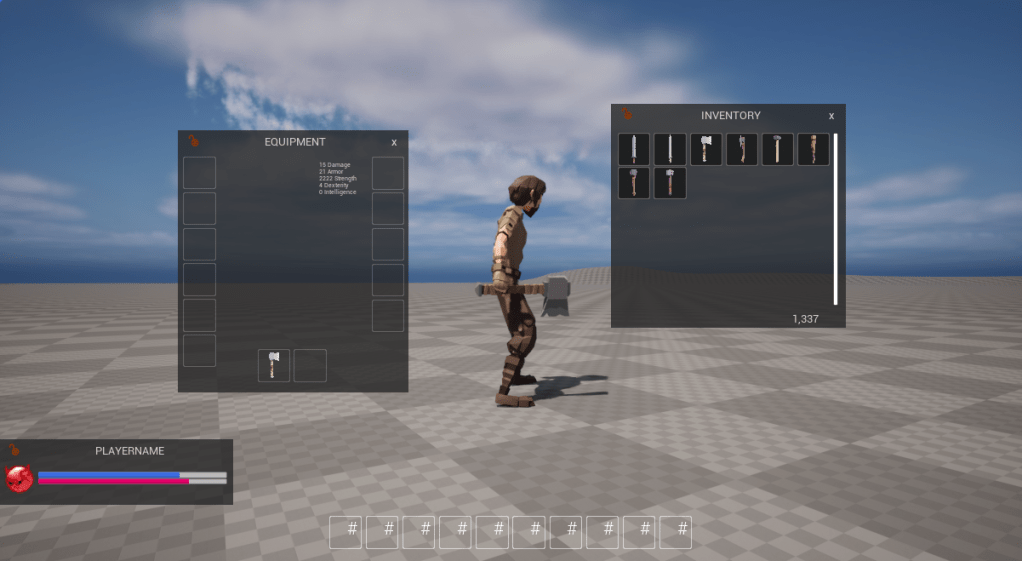
Phew it’s been a minute. I took a little break, but I am back working on PMO, and where I left off was implementing equipment and inventory. I decided to use an RPC like mechanism, taking advantage of the reliable UDP layer I’ve already built. While movement is unreliable, and we just resend deltas, other communications will require a more proper RPC like mechanism.
To make things even more complicated I need this RPC like mechanism to bubble up all the way to Unreal engine. I’ll admit this design probably isn’t the best but it’s working and does what I need so far.
In the beginning (client code)
Let’s start from the beginning, getting our inventory when we connect. We will need to send a request to the server to populate our inventory so where does this begin? In our Unreal engine character’s BeginPlay() calling RefreshInventory:
void APMOClientCharacter::RefreshInventory()
{
	network::RequestGetInventory Request;

	auto GameInstance = Cast<UPMOGameInstance>(GetGameInstance());
	if (!GameInstance)
	{
		return;
	}

	GameInstance->Rpc->RegisterRpcTask(Request, FOnRPCComplete::CreateWeakLambda(this, [this](const network::RpcResult&, const network::FailureCode Code)
	{
		if (Code != network::FailureCode::None)
		{
			UE_LOG(LogTemp, Warning, TEXT("RPC Failure, failed to get inventory"));
			return;
		}
		UE_LOG(LogTemp, Warning, TEXT("RPC Inventory returned!"));
	}));

	EntityComponent->Entity().set<network::RequestGetInventory>(Request);
}
We first create a flecs “request” component. We then take this request object, and call RegisterRpcTask with the Request component and a lambda/callback. On callback we check if we got a failure code, and if so, print an error otherwise we just print a debug OK message.
Let’s look at our RPC callback handler class:
DECLARE_DELEGATE_TwoParams(FOnRPCComplete, const network::RpcResult&, const network::FailureCode);

/**
 * A very basic RPC handler that allows us to know when RPC responses come in. We don't
 * really need to pass in rpc response data as that will be set by our PMO client library
 * and extractable by getting the entity component that has the response data set for it.
 */
class PMOCLIENT_API PMORpcSystem
{
public:
	PMORpcSystem();

	uint32_t GetNewTaskId();

	/** Register an rpc request and an oncompletion delegate handler */
	uint32_t RegisterRpcTask(network::RpcRequest& Request, FOnRPCComplete OnComplete);

	/** Handle callback, called from our PMOGameMode RPC handler systems */
	void HandleCallback(uint32_t TaskId, network::RpcResult& Request);

	~PMORpcSystem();

private:
	uint32_t TaskId{};
	TMap<uint32_t, FOnRPCComplete> Callbacks;
};

// implementation...
uint32_t PMORpcSystem::GetNewTaskId()
{
	return TaskId++;
}

uint32_t PMORpcSystem::RegisterRpcTask(network::RpcRequest& Request, FOnRPCComplete OnComplete)
{
	Request.RequestId = GetNewTaskId();
	Callbacks.Add(Request.RequestId, OnComplete);
	return Request.RequestId;
}

void PMORpcSystem::HandleCallback(uint32_t Id, network::RpcResult& Result)
{
	auto Callback = Callbacks.FindAndRemoveChecked(Id);
	Callback.ExecuteIfBound(Result, network::FailureCode::None);
}
We take advantage of Unreal’s delegate system and create a FOnRPCComplete that takes two params, an RpcResult and a failure code. (I realize now this could just be a 1 param of RpcResult and pass in the code that way, but I digress…)
All RPC like requests must go through this system so we can register callbacks. So we call Register, it creates a RequestId (which is passed all the way down to our UDP reliablity layer as a sequence Id for the packet), add the Id to our TMap of callbacks and then return the Id if the caller needs it for tracking in it’s own resources.
You maybe wondering why this is even necessary. It’s because almost all this game logic is happening in our pmoclient.dll which doesn’t know anything about Unreal engine. So, let’s peek at what happens in the pmoclient library when the network::RequestGetInventory flecs entity component is added to our player:
 GameWorld.system<network::User, network::PMOClient, network::NetworkReady, network::RequestGetInventory>("RequestInventory")
        .kind(flecs::PostLoad)
        .each([&](flecs::iter& It, size_t Index, network::User &Network, network::PMOClient &Client, network::NetworkReady, network::RequestGetInventory &Request)
        {
            Logger->Info("RequestInventory checking timeout");
            flecs::entity Player = It.entity(Index);
            if (HandleRpcTimeout(Player, Request, It.delta_time()))
            {
                Logger->Info("RequestInventory timeout, removing");
                Player.remove<network::RequestGetInventory>();
                return;
            }
            // Already requested a respawn, exit early
            if (Request.RequestedTime > 0.f)
            {
                Logger->Info("RequestInventory already requested, time: {}", Request.RequestedTime);
                Request.RequestedTime += It.delta_time();
                return;
            }

            flatbuffers::FlatBufferBuilder Builder(128);
            Game::Message::GetInventoryRequestBuilder InvBuilder(Builder);
            auto Built = InvBuilder.Finish();

            ClientCommandBuilder CmdBuilder(Builder);

            CmdBuilder.add_opcode(Game::Message::ClientOpCode_RequestGetInventory);
            CmdBuilder.add_rpc_get_inventory(Built);

            Builder.Finish(CmdBuilder.Finish());
            SendRpcRequest(Builder, Client, Network.UserId, Request.RequestId, Game::Message::ClientOpCode_RequestGetInventory, &Request.RequestedTime, It.delta_time());
        });
This system is defined in our network_client.cpp file and runs when the network::RequestGetInventory is added anywhere. We first check if this component’s already been added and its timeout is exceeded, if not we build our flatbuffer message with our clientop code for ClientOpCode_RequestGetInventory, and then call SendRpcRequest:
void NetworkClient::SendRpcRequest(flatbuffers::FlatBufferBuilder& Builder, network::PMOClient &Client, uint64_t UserId, uint32_t SequenceId, Game::Message::ClientOpCode OpCode, double *RequestTime, float DeltaTime)
    {
        auto OutputLen = Builder.GetSize();
        auto ClientCommands = std::make_unique<std::vector<uint8_t>>();
        ClientCommands->resize(OutputLen);

        std::memcpy(ClientCommands->data(), Builder.GetBufferPointer(), Builder.GetSize());

        auto RpcRequest = std::make_unique<Game::Message::GameMessage>(UserId, SequenceId, std::move(ClientCommands), MessageData_EncClientCommand);
        RpcRequest->MessageReliability = Game::Message::Reliability::Reliable;
        RpcRequest->OpCode = OpCode;
        Client.OutQueue->Push(std::move(RpcRequest));
        Client.Client->NotifyWrite();
        *RequestTime += DeltaTime;
        Builder.Release();
    }
This takes our flatbuffer builder and copies in our data, creates a GameMessage, sets it’s reliability to reliable, sets the opcode and then notifies our network thread. So that’s the sending part of the client, what do we get back?
As a refresher, our network client pulls all UDP messages off a queue and calls ProcessServerCommand:
void NetworkClient::ProcessServerCommand(flecs::world &GameWorld, world::PMOWorld &PlayerWorld, const Game::Message::ServerCommand *Command)
    {
        switch (Command->opcode())
        {
            case Game::Message::ServerOpCode_Invalid:
            {
                Logger->Error("PreFrame: Server sent ServerOpCode_Invalid");
                break;
            }
            case Game::Message::ServerOpCode::ServerOpCode_Update:
            {
                PlayerWorld.ProcessServerUpdate(Command);
                break;
            }
            case Game::Message::ServerOpCode::ServerOpCode_Respawn:
            {
                break;
            }
            case Game::Message::ServerOpCode::ServerOpCode_Equip:
            {
                PlayerWorld.UpdatePlayerEquip(Command);
                break;
            }
            case Game::Message::ServerOpCode::ServerOpCode_GetInventory:
            {
                PlayerWorld.UpdatePlayerInventory(Command);
                break;
            }
            case Game::Message::ServerOpCode::ServerOpCode_AddInventory:
            {
                break;
            }
            case Game::Message::ServerOpCode::ServerOpCode_OpenContainer:
            {
                break;
            }
            default:
            {
                Logger->Error("PreFrame: Unknown opcode: {}", static_cast<uint16_t>(Command->opcode()));
                break;
            }
        }
    }
We switch off the opcode and call our PlayerWorld class, in this case UpdatePlayerInventory, and this is where it gets interesting
		auto GetDetails = Player.get<network::RequestGetInventory>();
        network::RequestGetInventoryResult Result{{network::FailureCode::None, GetDetails->RequestType, GetDetails->RequestId}};

        // Destroy anything in players Inventory as we are going to overwrite it
        auto PlayerInventory = Player.target<items::Inventory>();
        if (!PlayerInventory)
        {
            Log->Error("Unable to update player inventory as player does not have an inventory!");
            Result.Reason = network::FailureCode::ClientSideFailure;
            Player.set<network::RequestGetInventoryResult>({Result});
            return;
        }

        auto InventoryContainer = PlayerInventory.second();
        if (!InventoryContainer.is_valid())
        {
            Log->Error("Unable to update player inventory as player does not have a valid container in their inventory!");
            Result.Reason = network::FailureCode::ClientSideFailure;
            Player.set<network::RequestGetInventoryResult>({Result});
            return;
        }

        // if we have an inventory, we def have a container
        auto Container = PlayerInventory.get_mut<items::Container>();
        World.defer_begin();
        items::ForEachItem(PlayerInventory, [&](flecs::entity item)
        {
            item.destruct();
        });
        Container->UsedSlots = 0;
        World.defer_end();

        // Now instantiate items from prefabs and add to the players inventory
        auto StartIt = Command->rpc_get_inventory()->inventory()->begin();
        auto EndIt = Command->rpc_get_inventory()->inventory()->end();
        for (auto It = StartIt; It != EndIt; It++)
        {
            Log->Info("Id: {}, Type: {}, GameItemId: {}", It->id(), It->type(), It->item_id());
            auto InventoryItem = EquipmentService->SpawnFromPrefab(World, It->id(), It->item_id(), static_cast<items::ItemType>(It->type()));
            if (!InventoryItem.is_valid())
            {
                Log->Warn("Failed to spawn item from server: {}", It->id());
                continue;
            }
            items::TransferItem(InventoryContainer, InventoryItem);
            Container->UsedSlots++;
        }

        Player.remove<network::RequestGetInventory>();
        Player.set<network::RequestGetInventoryResult>({Result});
A couple of actions are taken here:
- Get access to the original network::RequestGetInventory component details
- Create a network::RequestGetInventoryResult and copy over some of the properties from that original component (such as the request/sequence id)
- Actually get our players inventory from the clients point of view, clear it out
- For each inventory item we take the item Id, (which is stored in a csv file with all the weapon/item details) and spawn a flecs prefab from it. BUT we also take in the servers Id and assign the flecs entity Id the same one the server sent us so they are synchronized
- We then call transfer to transfer the item into our inventory system that is managed by flecs relationships
- Finally we REMOVE the original RequestGetInventory component so our
RequestInventorysystem is no longer called- AND we set a new RequestGetInventoryResult component.
As far as PMO the library is concerned, we are done our inventory and state is synchronized with the server!
However, Unreal engine has no idea what just happened, so for that, we need to create a new flecs system. This time we define the flecs system in Unreal engine, and in particular our GameMode class:
void APMOClientGameMode::RegisterRPCResultHandlers(flecs::world &FlecsWorld)
{
	FlecsWorld.system<network::RequestRespawnResult>("OnRespawnResult")
		.kind(flecs::PostUpdate)
		.each([&](flecs::iter& It, size_t Index, network::RequestRespawnResult &Result)
		{
			GameInstance->Rpc->HandleCallback(Result.RequestId, Result);
			It.entity(Index).remove<network::RequestRespawnResult>();
		});

	FlecsWorld.system<network::RequestEquipResult>("OnEquipResult")
		.kind(flecs::PostUpdate)
		.each([&](flecs::iter& It, size_t Index, network::RequestEquipResult& Result)
		{
			GameInstance->Rpc->HandleCallback(Result.RequestId, Result);
			It.entity(Index).remove<network::RequestEquipResult>();
		});

	FlecsWorld.system<network::RequestAddInventoryResult>("OnAddInventoryResult")
		.kind(flecs::PostUpdate)
		.each([&](flecs::iter& It, size_t Index, network::RequestAddInventoryResult& Result)
		{
			GameInstance->Rpc->HandleCallback(Result.RequestId, Result);
			It.entity(Index).remove<network::RequestAddInventoryResult>();
		});

	FlecsWorld.system<network::RequestGetInventoryResult>("OnGetInventoryResult")
		.kind(flecs::PostUpdate)
		.each([&](flecs::iter& It, size_t Index, network::RequestGetInventoryResult& Result)
		{
			GameInstance->Rpc->HandleCallback(Result.RequestId, Result);
			It.entity(Index).remove<network::RequestGetInventoryResult>();
		});

	FlecsWorld.system<network::RequestOpenContainerResult>("OnRequestOpenContainerResult")
		.kind(flecs::PostUpdate)
		.each([&](flecs::iter& It, size_t Index, network::RequestOpenContainerResult& Result)
		{
			GameInstance->Rpc->HandleCallback(Result.RequestId, Result);
			It.entity(Index).remove<network::RequestOpenContainerResult>();
		});
}
And there it is, these systems are visible by Unreal and, since it has a reference to our Rpc system, simply calls the HandleCallback with the request id and result, and removes the Result component so we don’t keep firing our callback.
The server
The servers handling of all this is pretty straight forward, we start from accepting the RPC message in network_server.cpp:
void NetworkServer::ProcessClientCommand(flecs::world &GameWorld, const uint32_t UserId, const uint16_t SequenceId, const Game::Message::ClientCommand *Command)
    {
        auto PlayerEntity = PlayerQuery.find([&UserId](network::User& p) {
            return p.UserId == UserId;
        });

        if (!PlayerEntity.is_valid())
        {
            Logger->Warn("Unable to find player entity UserId:{}, not processing enc client command", UserId);
            return;
        }

        switch (Command->opcode())
        {
            case Game::Message::ClientOpCode::ClientOpCode_Invalid:
            {
                Logger->Error("User {} sent ClientOpCode_Invalid", UserId);
                break;
            }
            case Game::Message::ClientOpCode::ClientOpCode_Input:
            {
                ProcessClientInput(PlayerEntity, UserId, SequenceId, Command);
                break;
            }
            case Game::Message::ClientOpCode::ClientOpCode_RequestRespawn:
            {
                ProcessClientRequestRespawn(PlayerEntity, UserId, SequenceId);
                break;
            }
            case Game::Message::ClientOpCode::ClientOpCode_RequestGetInventory:
            {
                ProcessClientRequestGetInventory(PlayerEntity, UserId, SequenceId);
                break;
            }
            case Game::Message::ClientOpCode::ClientOpCode_RequestEquip:
            {
                auto Character = PlayerEntity.get_mut<character::PMOCharacter>();
                auto Slot = items::EquipmentSlot::INVALID;
                if (!Character)
                {
                    Logger->Error("User {} does not have character::PMOCharacter", UserId);
                    SendEquipResponse(UserId, SequenceId, false, Slot);
                    return;
                }

                auto EquipMsg = Command->rpc_equip();
                if (!EquipMsg)
                {
                    Logger->Error("User {} sent invalid/empty equip msg", UserId);
                    SendEquipResponse(UserId, SequenceId, false, Slot);
                    return;
                }

                flecs::id ItemId = GameWorld.id(EquipMsg->item());
                auto bWasEquipped = Character->EquipItem(Logger, static_cast<items::EquipmentSlot>(EquipMsg->equipment_slot()), ItemId, EquipMsg->container());
                Logger->Info("User {} equip response {} for Slot {} item id: {} (Slot Hands: {} {})", UserId, bWasEquipped, EquipMsg->equipment_slot(), EquipMsg->item(), static_cast<uint8_t>(items::EquipmentSlot::LEFT_HAND),static_cast<uint8_t>(items::EquipmentSlot::RIGHT_HAND));
                SendEquipResponse(UserId, SequenceId, bWasEquipped, Slot);
                break;
            }
            default:
            {
                Logger->Warn("User {} sent unknown opcode: {}", UserId, static_cast<uint16_t>(Command->opcode()));
                break;
            }
        }
    }
Much like the client we call some processing code to handle the rpc request and serialize the results for sending back:
void NetworkServer::ProcessClientRequestGetInventory(flecs::entity &Player, const uint32_t UserId, const uint16_t SequenceId)
    {
        flatbuffers::FlatBufferBuilder Builder(512);

        // Build vectors first
        std::vector<flatbuffers::Offset<Game::Message::ServerItemEntity>> InventoryEntities{};
        std::vector<flatbuffers::Offset<Game::Message::ServerItemEntity>> EquipmentEntities{};
        std::vector<uint8_t> Slots{};

        items::SerializeInventory(Builder, Logger, InventoryEntities, Player);
        items::SerializeEquipment(Builder, Logger, EquipmentEntities, Slots, Player);
        auto BuiltInventory = Builder.CreateVector<Game::Message::ServerItemEntity>(InventoryEntities.data(), InventoryEntities.size());
        auto BuiltEquipment = Builder.CreateVector<Game::Message::ServerItemEntity>(InventoryEntities.data(), InventoryEntities.size());
        auto BuiltSlots = Builder.CreateVector<uint8_t>(Slots.data(), Slots.size());

        // Then create & finish our Inventory response
        GetInventoryResponseBuilder Inventory(Builder);
        Logger->Info("Building Inventory");
        Inventory.add_inventory(BuiltInventory);
        Logger->Info("Building Equipment");
        Inventory.add_equipment(BuiltEquipment);
        Inventory.add_equipment_slots(BuiltSlots);
        Inventory.add_result(static_cast<uint8_t>(network::FailureCode::None));
        auto FinishedInventory = Inventory.Finish();

        // THEN create & finish our server command response
        ServerCommandBuilder CmdBuilder(Builder);
        CmdBuilder.add_opcode(Game::Message::ServerOpCode_GetInventory);
        CmdBuilder.add_sequence_id(SequenceId);
        CmdBuilder.add_rpc_get_inventory(FinishedInventory);

        Builder.Finish(CmdBuilder.Finish());
        SendRpcRequest(Builder, UserId, Game::Message::ServerOpCode_GetInventory);
    }
We just create a flatbuffers vector for our inventory/equipment etc, we set the SequenceId of the rpc to whatever the client used, then fire back the RpcRequest:
void NetworkServer::SendRpcRequest(flatbuffers::FlatBufferBuilder& Builder, uint64_t UserId, Game::Message::ServerOpCode OpCode)
    {
        auto OutputLen = Builder.GetSize();
        auto ServerData = std::make_unique<std::vector<uint8_t>>();
        ServerData->resize(OutputLen);

        std::memcpy(ServerData->data(), Builder.GetBufferPointer(), Builder.GetSize());
        Builder.Release();

        auto RpcReply = std::make_unique<GameMessage>(UserId, std::move(ServerData), MessageData_EncServerCommand);
        RpcReply->MessageReliability = Game::Message::Reliability::Reliable;
        RpcReply->OpCode = OpCode;
        OutQueue->Push(std::move(RpcReply));
        Thread->NotifyWrite();
    }
Pretty straight forward!
So yeah, while it’s a lot of work and there’s quite a few steps that could be simplified I think I’ll stick with this system unless something really goes wrong. But what I do like is I now have the ability to handle various failure events from the server in Unreal and handle them appropriately.
But yeah, now I can get inventory items and equip them and (soon) handle errors gracefully.
If you want to see a more complex callback, check out the PMOInventoryComponent that’s attached to our player.
Until next time!
 a place to jot