
While working on my network equipment code I noticed some strange behavior as I kept killing my clients and reconnecting them. After restarting my clients it felt… sluggish when reconnecting, like it was taking many ticks for the client to actually login. This spiraled into finding quite a few bugs.
It started with 103% CPU
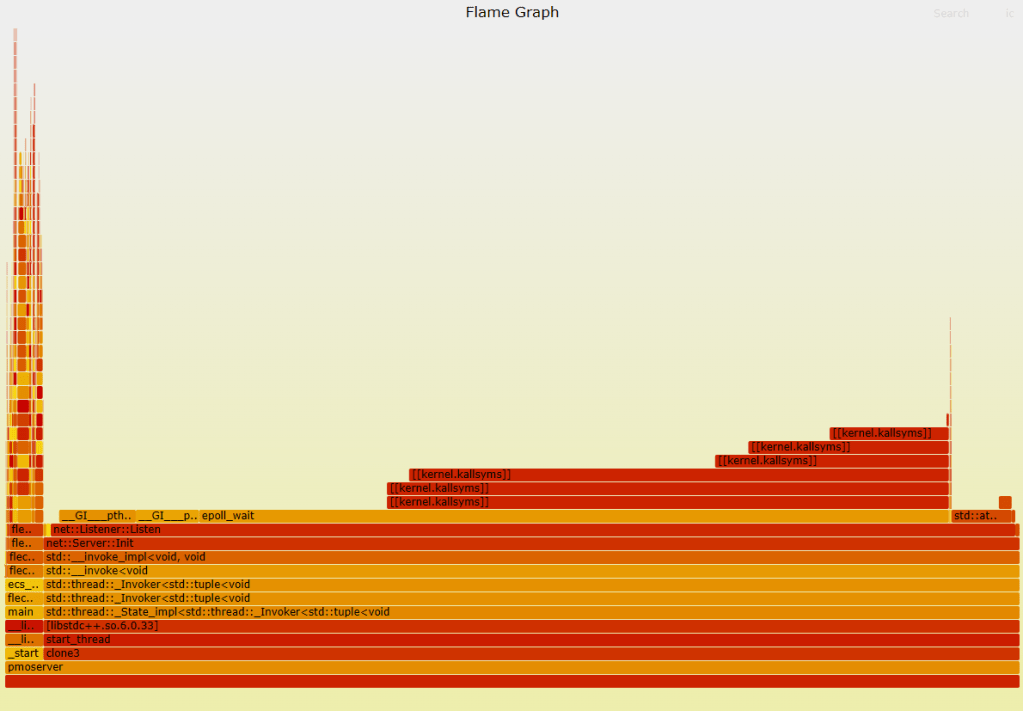
The first thing I did was run top on my server, previously my CPU hovered around 3-5% usage, even in debug mode when no one was connected, but I noticed mine was at 103~105%. I immediately suspected a busy loop some where, so I went to my trusted FlameGraph tool.
Sure enough, looking at the graph I can see a significant amount of time being spent in net::Listener::Listen. I immediately suspected I changed something with epoll, and there it was, a big fat zero staring at me:
auto Ready = epoll_wait(EpollFileDescriptor, Events, MaxEventSize, 0);
if (Ready < 0)
{
	std::error_code ec(errno, std::system_category());
	Logger.Error("Server::Listen exiting {}\n", ec.message());
	return;
}
At some point I changed epoll_wait to wait 0ms… or in other words, busy loop. This was a very quick easy fix of just setting it to 10ms. Since it’s edge triggered, it will trigger anytime an event worth reading is available anyways, so setting it to 0ms is just wasteful.
After my fix, I re-ran top and was happy to see my server is back to < 3% CPU with no clients and around 5-7% with one or two clients. Creating a new flame graph confirms:

Bug fixed, yet clients still laggy to connect?
OK. So something else was going on, I noticed in my logs after a client disconnected, and then reconnected I was getting ClientOpCode packets BEFORE my auth packets (auth packets are like 192 bytes, ClientOpCode packets are usually around 300 bytes). After a while these opcode packets would stop and then the auth packets would start coming in.
This made me realize something was wrong with my epoll code. So, off to the documentation we go:
The epoll API performs a similar task to poll(2): monitoring
multiple file descriptors to see if I/O is possible on any of
them. The epoll API can be used either as an edge-triggered or a level-triggered interface and scales well to large numbers of watched file descriptors.
Hmm what is edge triggered vs level triggered?
Edge triggered simply means we wait for any number of events, meaning we need to be signaled when there are no more events for reading. This is done by the call to recv/recvfrom returning EAGAIN or EWOULDBLOCK. This would signal to the application that there’s nothing left to read, so we can then go back to our epoll_wait(...) call.
Level triggered acts more like poll/select, it just notifies you something is ready, so you would read a single packet, then go back to epoll_wait(...) read a packet, go back to epoll_wait(...) and so on.
Well I was running epoll_wait with EPOLLET (edge triggered) but ONLY reading one packet at a time! So I must have been either losing packets, or more likely, I was just inefficiently leaving packets in the buffer even though they were ready to be read. Since epoll already signaled to me that they were ready, the read from the next epoll_wait would return those stale packets first, until a new packet came in.
The fix here was to run my ProcessPacket code in a loop, and for every recv call, I simply check if errno is set to EAGAIN or EWOULDBLOCK (although I may not need EWOULDBLOCK since my sockets are nonblocking?).
// In edge-triggered mode, we must drain all available packets
// until recvfrom returns EAGAIN/EWOULDBLOCK
while (true)
{
	struct sockaddr_in ClientAddr;
	std::memset((char *)&ClientAddr, 0, sizeof(ClientAddr));

	std::array<unsigned char, PMO_BUFFER_SIZE> PacketBuffer{0};

	auto PacketLen = ListenerSocket->Receive(ClientAddr, PacketBuffer.data(), BufferSize);
	if (PacketLen < 0)
	{
		// EAGAIN/EWOULDBLOCK means no more packets available
		if (errno == EAGAIN || errno == EWOULDBLOCK)
		{
			break;
		}
		Logger.Warn("Recv error: {}", errno);
		break;
	}
	if (PacketLen == 0)
	{
		Logger.Warn("Recv'd 0 bytes");
		break;
	}
	Logger.Debug("Calling ProcessPacket with {} bytes", PacketLen);
	ProcessPacket(PacketBuffer, PacketLen, ClientAddr);
}
Anyways, silly me for not reading the documentation closer.
Why am I getting these ReadNetworkBuffer errors?
As a refresher, I have a server jitter buffer which keeps track of clients historical inputs, every new update contains the old inputs the player sent. This is so when replaying packets the server can extract what exactly the player sent even if some packets got dropped.
Unfortunately, my Buffer.Get calls were returning nullptrs, and I couldn’t really figure out why I had such large gaps in missing packets:
std::unique_ptr<ServerJitterData> FrameData = Buffer.Get();
if (!FrameData)
{
    Logger->Warn("User {} ReadNetworkBuffer FrameData was empty, possible dropped packet not filled with historical data", User.UserId);
    return;
}
To isolate the issue, I ran my server and then connected two linux headless clients. To my surprise I didn’t see any of those errors. Was this a windows only bug? Instead of running my usual two windows clients, I ran only one. At first I didn’t see any of the errors, until I alt-tabbed the game window to focus on my server … and then they started pouring in.
Windows of course, was reducing the FPS of the game client since it was backgrounded. My code was incrementing my buffer read for EVERY frame, whether or not a packet came in. Meaning if the client suddenly drops to 10 FPS, my server is still trying to read at 30 FPS, and incrementing the sequence id by one every time even though the client never sent a packet for that frame.
The fix here was to Peak the buffer first, and if it was null, the client’s FPS may have dropped, so don’t increment our read sequence id. We now only increase that read incrementor when we successfully get the frame data from Buffer.Get().
// Peek at next entry to see if data is available
// This prevents consuming faster than the client produces (e.g., when client is throttled/backgrounded)
const ServerJitterData* NextData = Buffer.Peek();
if (!NextData)
{
    // No new input available - client sending slower than server tick rate
    // Keep using previous input (already in Inputs component from last frame)
    Logger->Debug("User {} ReadNetworkBuffer no new data available, reusing previous input", User.UserId);
    return;
}

// Data is available, consume it
std::unique_ptr<ServerJitterData> FrameData = Buffer.Get();
if (!FrameData)
{
    // Should never happen since Peek succeeded, but handle defensively
    Logger->Error("User {} ReadNetworkBuffer FrameData was empty after Peek succeeded", User.UserId);
    return;
}
Have I mentioned netcode in games is hard?
 a place to jot