
So, I have quite a big announcement. That whole combat system I built using Flecs scripts and behavior trees? Well I had so much fun trying out builds that I ended up turning it into a game. Introducing Writ of Battle! I’ve been putting in crazy hours trying to get everything ready for a steam play test. During this, I realized some of this information may be beneficial to those in the gamedev and in in particular, multiplayer gamedev communities.
This is going to be a long post, because there’s a lot of things you need to concern yourself when you build a multiplayer service and many, many steps you’ll need to complete to ensure your services scale and can adapt to change.
Feel free to sign up for my playtest, it should be live if you are reading this in the first two weeks of this post! I’ll probably release the game at the $1.99 sticker mark, since I’m basically a first time game dev, and it’s a pixel art pvp simulator.
Architecture
My game is made up of six major components:
- Simulation Server: This is a C++ service running https://flecs.dev for the ECS engine and an HTTP server that takes in flat buffer messages from our API service and runs the actual game simulation.
- API Service(s): This is a Go Gin gonic server that is horizontally scalable. Client connections use Server Side Events (SSE) to push down messages. Only leaders hold an in-memory copy of state but all state is stored in Redis or PostgreSQL, meaning servers should be able to die without negatively impacting a client for more than 30 seconds.
- Authentication – We verify tickets from steam using their API to ensure players actually own the game. We send them back a JWT and a refresh token after we validate their steam ticket.
- Match making – I use Redis and redlock for managing a distributed queue based match making system with leader support. If a leader fails to check into Redis after ~10 seconds, an election occurs for other API services to take over. At which point they load in all match data into memory and continue matching players based on their submitted spread amount.
- Player socials – Friends lists / block / accept etcetera
- Replays – Access your previous match data which then fetches the data from a storage bucket, database just stores the reference to the bucket.
- Reporting – We allow players to submit bug reports / suggestions.
- General stats – Players stats; kill death ratio, most played classes, ranking etc.
- Redis – Handles all match making queue data that a single Go API leader service manages.
- PostgreSQL – Managed instance stores all player data except replays.
- S3 Compatible Storage – Stores ztsd compressed FlatBuffers serialized replay match data so players can rewatch whenever. I use zstd to keep egress costs down. zstd gets me like 3-4x compression on my FlatBuffers files!
- Dart/Flutter Client – The main front end client using https://flame-engine.org (another ECS engine!). But this only replays the data, simulations are never run locally, even bots. (Because cheaters, it’s always the cheaters.)
Scaling
For Playtest I’m running a very light weight build to keep costs down and there’s no point and scaling out yet. I’m using a single 4 vCPU / 8GB system that hosts my API service and two simulation servers and the Redis instance. This is fronted by a Load Balancer which handles the TLS termination so I don’t have to deal with certificates anywhere. This system connects to our managed database and also pulls data out of our s3 bucket to forward simulation data down to clients.
Of course for production that won’t cut it. I plan on scaling out to N number of API services and N number of simulation servers each running 1 simulation service per 1/2 vCPUs. Redis will be moved to a dedicated instance, and possibly a managed service if the game blows up. This will allow me to horizontally scale out additional simulation services as well as API services.
Since we are using Redis as the queue, and we have leader election based off keys in redlock, our API services can basically be killed at anytime. While the SSE connection will drop, events won’t be as they’ll be resent when clients connect back to a new API service. In my game you can queue up a bunch of matches and then just quit, come back and see how you did.
Costs
In total, my play test development environment would have cost me about $56 a month. A semi-scaled out production environment will probably be about $150 a month to support about 5000 users. If the game blows up, it really depends, but could go into thousands. I am currently running off of Digital Ocean and they give $200 in starting credits, so my play test will basically be hosted for free.
My biggest concern is egress network costs, they are something you REALLY have to watch out for. GCP and AWS can really slam you in costs if you are not careful sending data out. This is one of the reasons I chose Digital Ocean, every new droplet I bring online gives me another 4000GiB of month outbound transfers.
Why egress matters is that I’m sending replays of simulations down to clients. Which is why I went with FlatBuffers. It lets you selectively send data if it’s set, so we drop data from replays if it’s not there., e.g. delta encoding) and zstd to compress. zstd compresses FlatBuffers really well, I’m seeing 30-40% compression, so my average replay size is about 200-400kb. So given that, 500,000 matches is only about 0.4GB. With two players that means I have to send it out 2x so it’s really 0.4GB for 1,000,000 replay transfers.
Load testing
I can not stress enough how important doing proper load testing is before you even think about releasing an online service. I have found many, many problems with my system by doing load testing. I also strongly recommend mocking out each individual component so you can load test in isolation. For example I mock out the simulation server, the s3 bucket, Redis and pgsql all by passing in different cli arguments (e.g. --mock-sim).
Be sure to test your local systems and your dev environments, things like Load Balancers change how connections are managed and you may find additional errors in your assumptions, like connection timeouts if no heartbeats are sent, woops!
I originally started on a 2 vCPU 2GB instance but was only getting about 1.2 simulations per second, this just wouldn’t cut it even for alpha. For testing, I built a custom simulation client that I could run/inject into the docker network. This was very helpful because I could isolate exactly how long a simulation took. Running simulations went something like this:
$ docker run --rm --network wob_default -v "$(pwd):/app" -w /app \ golang:1.25 go run main.go -urls \ "http://sim0:8081,http://sim1:8081" -concurrent 10 -total 50=== Sim Benchmark ===URLs: [http://sim0:8081 http://sim1:8081]Concurrent: 10 | Total: 50 | Payload: 2060 byteshttp://sim0:8081: healthy (status 200)http://sim1:8081: healthy (status 200) completed: 10/50 (3.4/sec) completed: 20/50 (3.7/sec) completed: 30/50 (3.6/sec) completed: 40/50 (3.6/sec) completed: 50/50 (3.5/sec)=== Results ===Total time: 14.124sCompleted: 50Failed: 0Throughput: 3.54 sims/secLatency: p50: 2.196s p95: 6.545s p99: 8.636s min: 1.006s max: 8.636sThis was OK but I felt it could be faster, so I went over my simulation code and identified a bunch of poorly optimized areas (e.g. not caching things). After making a bunch of changes including:
- Caching loading of files
- Caching flecs entity children
- Using compiler optimization flags
- Pre-allocating some vectors I got up to:
docker run --rm --network wob_default -v "$(pwd):/app" -w /app \ golang:1.25 go run main.go \ -urls "http://sim0:8081,http://sim1:8081" \ -concurrent 10 -total 50=== Sim Benchmark ===URLs: [http://sim0:8081 http://sim1:8081]Concurrent: 10 | Total: 50 | Payload: 2060 byteshttp://sim0:8081: healthy (status 200)http://sim1:8081: healthy (status 200) completed: 10/50 (5.2/sec) completed: 20/50 (6.2/sec) completed: 30/50 (6.0/sec) completed: 40/50 (6.0/sec) completed: 50/50 (6.1/sec) === Results ===Total time: 8.219sCompleted: 50Failed: 0Throughput: 6.08 sims/secLatency: p50: 1.271s p95: 2.592s p99: 4.883s min: 633ms max: 4.883sBasically doubled my throughput! This should be good enough for alpha at least.
Steam
I plan on first releasing on steam for a couple of reasons. First and foremost, they make managing releases and updates and playtests quite easy. Secondly, they make it extremely easy to manage users/accounts and authorization. I don’t want to have to require users to ‘create accounts’ and I CERTAINLY do not want to have to handle Personally Identifiable Information (PII). By using Steams’ Ownership Verification API, my game gets a ticket from steam via the user’s account. The game client then sends this ticket to my Go API service which validates it. If the player owns my game, I send them back a JWT, if not, they get dropped.
Setting up the steam store and partner information was a LOT of work. I highly recommend checking out this blog post on all the capsules and layouts you need to make. Do this while you wait for your steam account to be validated. Making all the crazy logos and capsules took half a weekend. It’s kind of annoying to setup but it’s also too boring to write about, so unless someone really wants a write up of the process of making a play test on steam, let me know and I’ll write it up.
DevOps
For those who don’t know, I work for GitLab during my day job. So DevOps is something I interact with every single day. What this really means is I try to automate as much as I can. I don’t want to have to do anything manually if I don’t have to. Since I have multiple services to build and test I needed to get my CI/CD pipeline setup before even alpha starts.
GitLab gives you about 500 minutes of CI/CD for free a month. I blew through it in about one day. Luckily, we also allow customers to bring their own runners! Which is what I did. I setup two runners (all on the same machine). A windows based runner, where I tagged it as a windows runner. And a docker-executor runner which uses docker on my machine to kick off all testing/deploy jobs. The windows runner is strictly for building the front end steam client/game.
Functional/E2E Testing
Since I’m using docker-compose and containers, I have an entire test network setup that I can use for local testing. Dart let’s you hot reload which makes UI tweaks and changes go way faster. Highly recommend. For C++ I’m using Catch22 tests and have thousands of assertions. There’s a LOT of edge cases I have to concern myself with so my test suite grows every time I touch anything. I should also shout out to how easy it is to test flecs based games. My god it’s great being able to isolate systems and components for testing! It really makes it easy to keep everything run smoothly and it’s just easier to reason about.
As for the Go API service, I do not really like mocking frameworks so I spin up Redis and PostgreSQL instances for my functional tests, I highly recommend doing this over ‘mocking’ libraries, they just fail to capture the craziness of a real environment.
Finally, while doing dev testing in the dev environment (Digital Ocean) I have a build flag that can be turned on dev endpoints to help in testing. I’ve now disabled for my play test as now my play testers are my debuggers ;).
Regarding CI/CD, I have three systems to build, all have their own testing environments, in GitLab these just become jobs I run in parallel, here’s my C++ build/test job:
test:cpp: stage: test tags: - docker image: ubuntu:24.04 rules: - if: $CI_COMMIT_MESSAGE =~ /\[skip tests\]/ when: never - if: $CI_COMMIT_TAG =~ /^v\d+/ - if: $FULL_BUILD - changes: - wbcombat/**/* variables: FETCHCONTENT_BASE_DIR: /tmp/fc-deps before_script: - apt-get update && apt-get install -y --no-install-recommends \ cmake g++ make git ca-certificates python3 python-is-python3 script: - cd wbcombat - cmake -S . -B build -DCMAKE_BUILD_TYPE=Debug - cmake --build build -j$(nproc) - cd build && ctest --output-on-failureMy Go API service requires the most testing as it’s touching a bunch of infrastructure. I spin up Redis and PostgreSQL docker containers and reference them as services in my tests:
test:go: stage: test image: golang:1.25 tags: - docker rules: - if: $CI_COMMIT_MESSAGE =~ /\[skip tests\]/ when: never - if: $CI_COMMIT_TAG =~ /^v\d+/ - if: $FULL_BUILD - changes: - server/**/* services: - name: redis:7-alpine alias: redis - name: postgres:18.1-alpine alias: postgres variables: POSTGRES_USER: wbcombat POSTGRES_PASSWORD: XXXXX POSTGRES_DB: wbcombat variables: DATABASE_URL: "postgres://wbcombat:XXXXX@postgres:5432/wbcombat?sslmode=disable" GOOSE_DRIVER: postgres GOOSE_DBSTRING: "host=postgres port=5432 user=wbcombat password=XXXX dbname=wbcombat sslmode=disable" PGHOST: postgres REDIS_URL: "redis:6379" GOPATH: $CI_PROJECT_DIR/.go cache: key: go-mod-${CI_COMMIT_REF_SLUG} paths: - server/.go-cache/ policy: pull-push before_script: - export GOCACHE="$CI_PROJECT_DIR/server/.go-cache" - export PATH="$CI_PROJECT_DIR/.go/bin:$PATH" - go install github.com/pressly/goose/v3/cmd/goose@latest - cd server - goose -dir migrations up script: - go test -v -race -tags integration ./... - go build ./...Note: You should never store passwords directly in CI configs, but these instances are temporary and only live for the lifecycle of the tests so it’s not a problem in this particular case. What you SHOULD be doing (if your provider supports it) is use OIDC to have it attest to your project and then you don’t have to worry about passwords or keys or any other garbage, you just link it to a service account. Unfortunately, Digital Ocean does not support this yet.
Infrastructure as Code (IaC)
You never really want to be logging into your cloud provider’s web UI directly to build your environment. The recommended approach to keep things consistent is to use IaC. My particular choice in poison for this is terraform/OpenTofu. I have two different environments (one for dev, one for prod). I then create modules which each environment references to keep things standardized across both:
- infra/
- cloud-init/
- environments/
- dev
- prod
- modules/
- api-server
- combined-server
- database
- load-balancer
- networking
- redis-server
- sim-server
- spaces
This allows me to re-use all of these modules across my environments, but specify different variables / sizes of instances for dev and production environments. Then in GitLab, I use our CI components for handling OpenTofu so I can plan and deploy these environments in my pipelines.
It basically looks like this (just dev, prods basically the same):
plan:dev: extends: [.opentofu:plan] stage: validate tags: - docker variables: GITLAB_TOFU_ROOT_DIR: infra/environments/dev GITLAB_TOFU_STATE_NAME: dev rules: - if: $CI_COMMIT_TAG =~ /^v\d+/ when: manual allow_failure: true - if: $CI_COMMIT_BRANCH == "main" changes: - infra/**/* - if: $CI_COMMIT_BRANCH == "main" when: manual allow_failure: truedeploy:dev: extends: [.opentofu:apply] stage: deploy tags: - docker variables: GITLAB_TOFU_ROOT_DIR: infra/environments/dev GITLAB_TOFU_STATE_NAME: dev needs: ["plan:dev"] rules: - if: $CI_COMMIT_TAG =~ /^v\d+/ when: manual allow_failure: true - if: $CI_COMMIT_BRANCH == "main" changes: - infra/**/* when: manual - if: $CI_COMMIT_BRANCH == "main" when: manual allow_failure: trueAnother thing to note, GitLab has a remote backend for storing terraform state so you don’t have to worry about your state getting desynchronized. This can be a real problem if you use multiple dev devices or have multiple developers pushing changes. You just configure it on init in your plan stage and from then, on all state files are tracked in GitLab.
Security & Logging
As a vulnerability researcher, security has kind of been my jam for the past +25 years. Most of my early career was finding vulnerabilities in applications, recently it’s more focused on writing tools to do this. Game services have quite the large attack surface and security can not be an afterthought.
If you haven’t already, I strongly recommend reading my post on You can’t get more adversarial than PvP MMORPGs. Most of these attacks also apply to my game. Let’s break down what I’m concerned about and where I took precautions.
Cheaters exploiting my simulation
To combat this, I made the decision to move all simulations to a centralized server, including bot matches. While it will end up costing me (mainly egress data transfers), the risk of someone just running simulations locally to find winning combinations that can’t be beat is too high. This way I can monitor my services directly to identify players attempting to break the game simulation, and make any balancing changes necessary.
Users can’t really exploit their usual hacks; speed hacks, visibility hacks or anything else because it’s all a simulation. Their only inputs is their team, their abilities, and their tactics. All of which I validate and control. Can they find a tactic /ability combo that breaks the sim? Probably! I did create fuzz testing to randomly generate thousands of matches and make sure they don’t go into a “Draw” state too much however. I combat aginst draws by implementing a fatigue system that causes healing to decrease, and damage to go up to force a win if the simulation runs for too long. This helps keep the simulations under 3-4 minutes. I max out at 10,000 ticks and force a draw if one team doesn’t win.
Your standard exploits
- SQL Injection: All queries are created using placeholder values for PostgreSQL (e.g. prepared statements). Code is generated off it using sqlc. This makes it really easy to reason about any possible injection points. As long as I don’t use format specifiers like
%sand don’t write pl/pgsql functions that take in user input, I’m pretty safe here. - Cross-Site Scripting: The only risk I have here is my admin panel where I monitor all my services. I explicitly encode all data that comes from users, and for my game there’s only about 2-3 places that user data can come from.
- Insecure Direct Object Reference (IDOR) I extract user Ids from JWT protected / validated data and use that for all look ups for things like friend lists, replays, challenges etc, meaning you can’t just attempt to access other players replays if they figure out my APIs.
- Unprotected APIs: All routes use a JWT middleware for authorization. To ensure I don’t miss protecting a route by accident, a test was created that loads all routes and issues HTTP requests to each one. If any of the HTTP requests don’t get a 401/403 error response, I fail the test and break the build.
- Validation: All data sent from players is validated first client side, then by our Go service before being translated into a new message that is sent to the simulation server. This includes common things like making sure sizes are sane, and referenced values actually exist. Validation is also done client side just so there’s no unexpected surprises for users if they try to insert random garbage into player names or things like that.
- Rate limiting: Using Redis I limit how many authentication attempts can be made per IP.
Logging
All of my services are running in docker for ease of deployment. This also lets’ me easily setup logging for them. I chose grafana’s free tier, which offers 50GB of log hosting a month, which… I think should suffice, at least for my play test. If it turns out I need more, I’ll just pay for it. Logging is setup using Loki for docker using the grafana/alloy:latest container and sends off all my containers logs to the cloud version of Loki. I also plan on setting up alerts to email me if things are going south.
Versioning
There’s a few things to talk about when discussing versioning.
- Data/Protocol: Our flat buffer data structures are versioned as they can and will change over time. This is the primary currency between all systems, client, API and simulation. For replays, clients can rewatch old matches at anytime, meaning the replay data could be old/outdated. By versioning this data we can ensure clients will be able to switch to playing older data buffers if necessary.
- Schemas: Like data, our PostgreSQL schemas are versioned and I use goosely for migration management. On startup, API services ensure the database schema is up to date.
- Client/Servers: I’m using semver for the client builds, simulation servers, and API services to track releases.
Version management
As I mentioned, I use semver because it’s what I’m comfortable with. Also I use the changie toolchain to help coordinate releases. Here’s the basic flow:
- Create new feature branch in git
- Make changes, and create a changie log with
changie new. I then choose between Fixed/Changed/Added/Remove. This helps automatically determine what part of the version to update (major / minor / patch) - Push changes, wait for tests to pass, then merge to main
- Once on main I automated the whole changie batch / release process with a script (see below)
- I commit via this release.sh script which kicks off my CI/CD pipeline for doing releases via the git tags. By modifying the semver versions, this changes my terraform state to have the planner realize it needs to redeploy all my docker containers with the latest version.
- The client side game is built using the Windows runner and the build artifact is pushed to the artifact / package registry in GitLab.
- A manual ‘deploy’ job has to be clicked by me to bring up the new instances (API services/simulation services etc). It waits for it to settle/be healthy then it kills the old instances and the load balancer switches traffic to my new deployment.
- I then have a script that downloads my game client and runs the steam deployment
steamctltool to push the build into my Steam depot. - I login to steam to update the depot to point to my latest build/release
- Clients are notified of a new change on next launch of steam and it updates automatically. This auto-update is another reason I went with steam to start
Here’s the changie release script I use:
changie batch "$NEXT_VERSION"changie mergegit add .changes/ CHANGELOG.mdCOMMIT_MSG="chore: release v$NEXT_VERSION"if [ "$SKIP_TESTS" = true ]; then COMMIT_MSG="$COMMIT_MSG [skip tests]"fiif [ "$SKIP_FLUTTER" = true ]; then COMMIT_MSG="$COMMIT_MSG [skip flutter]"figit commit -m "$COMMIT_MSG"git tag "v$NEXT_VERSION"git push && git push --tagsecho ""echo "Released v$NEXT_VERSION"Operations
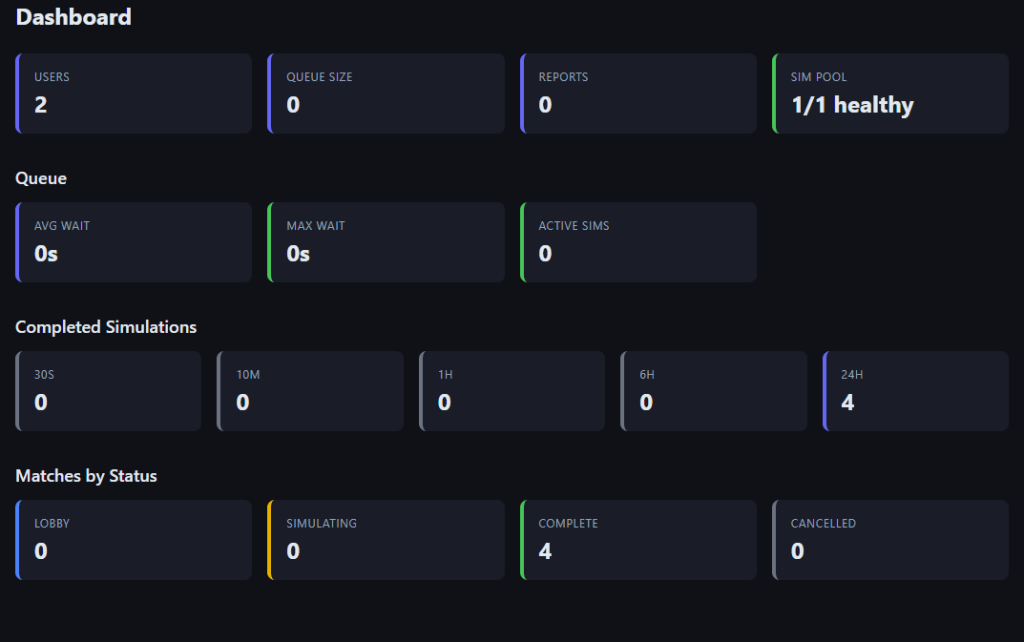
The last bit I should mention is operations, I built a custom admin panel that monitors my queues, matches, and gives me direct links to replays so I can debug/figure out what broke.
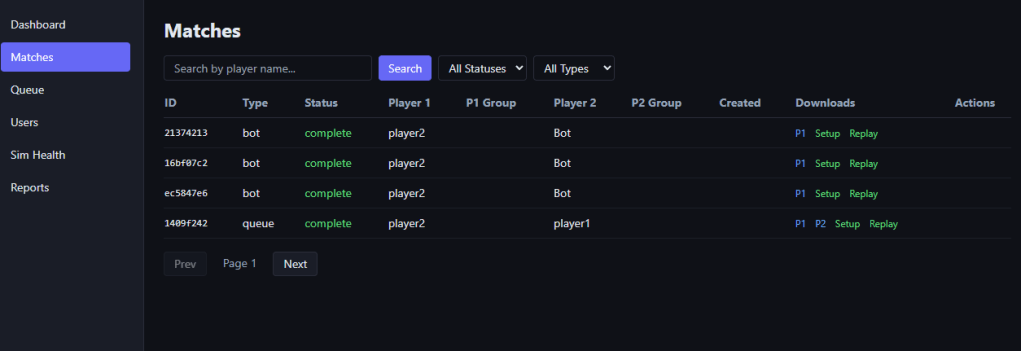
For logging, I use grafana so I can just use their web admin panel to monitor for various service errors, but my admin panel gives me more detailed game health info:
Conclusion
I hope this post has given some insight into one possible way of preparing an online game for release. I’ve been putting in many late nights the last two months and am both terrified and excited to get this thing into peoples hands. I will be doing, at a minimum, a two week play test / alpha to see what types of crazy builds people come up with. Hopefully I get a lot of good feed back and bug reports during this time, as well as possible suggestions for improvement.
See you on the battlefield!
 a place to jot