
Happy new years folks, continuing on my work from earlier I wanted to reduce the size of my data structures a bit as they are unoptimized. This post will go into some techniques and obvious changes to reduce my per-player sizes by 42 bytes per character, and reduce combat events by 8 bytes. Remember this is just for ‘new’ players becoming visible! Updated players sizes are much smaller as we are only sending deltas of the changes.
Not sending stuff
OK this is the easiest one to implement (mostly). We simply don’t send information we don’t need. First on the chopping block was players traits, there’s no need to send the players int/con/wis/str over the network (unless you are inspecting a character, in which case I could use an RPC).
So with that, we remove about 5 bytes (1 byte per stat).
Velocity
Next was velocity. I am calculating all players velocities on the server and sending that down to the player, including the velocity of all visible players, this is just not necessary. We send the server time (per client) in every packet, so given the last position, the server time, and the updated position we have all we need to just re-calculate the velocity on the client. Which is what we now do on the client’s world update state.
auto UpdateNetworkPlayer = Entity->player();
auto PreviousPosition = NetworkPlayer.get<units::Position>();
auto NewPos = units::Position{};

auto& NetworkCharacter = NetworkPlayer.get_mut<character::NetworkCharacter>();
auto DeltaServerTime = ServerTime - NetworkCharacter.ServerTime;
NetworkCharacter.UpdateServerTime(ServerTime);

if (UpdateNetworkPlayer->pos() != nullptr)
{
	NewPos = units::Position{UpdateNetworkPlayer->pos()->x(), UpdateNetworkPlayer->pos()->y(), UpdateNetworkPlayer->pos()->z()};
	NetworkPlayer.set<units::Position>({NewPos});
	Log->Debug("PreFrame: Player {}: Updating player {}, client at: {} {} {}", Player.id(), Entity->id(), NewPos.GetX(), NewPos.GetY(), NewPos.GetZ());
	if (NewPos != PreviousPosition)
	{
		JPH::Vec3 JphVel = ((NewPos - PreviousPosition) / DeltaServerTime) * 1000.f;
		NetworkPlayer.set<units::Velocity>({JphVel.GetX(), JphVel.GetY(), JphVel.GetZ()});
	}
}
We grab the current players position and the previous server time from the last packet we saw, if our position changed we set our new position and calculate New Position - Previous Position / Delta Server Time * 1000.f. We multiply by 1000 because our delta time is milliseconds.
There we go, we now no longer need to send 12 additional bytes per character!
Float compression
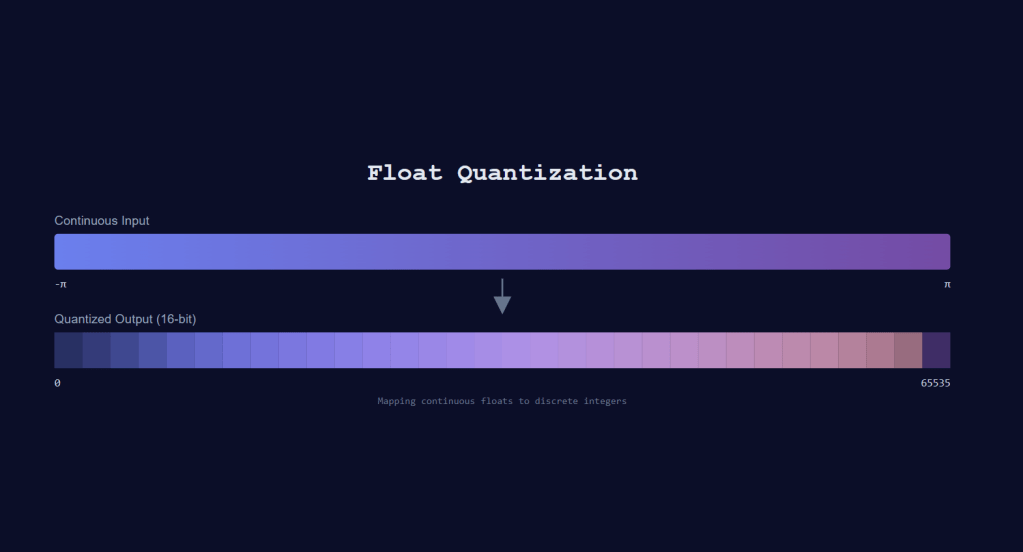
Games use floats for a lot of things, and my game is no different. However, the required precision of floats is dependent on where they are used. Things like player stats (health/mana etc), combat damage etc, USUALLY do not require much precision, in which case we can compress them.
How do we compress them? By removing precision, or quantizing them. I’m taking quite a few float values which are 4 bytes and stuffing them into uint16_t values which are 2 bytes. A nice and easy 50% reduction in size.
Here’s the places we can safely quantize:
- Combat damage amounts
- Attributes
- Health
- Stamina
- Mana
- Shield
- Yaw
- Pitch
Depending on my map sizes, I may get away with quantizing positional information, but for now I’m not going to touch it. With combat and attributes, we go from 20 bytes down to 10. For yaw and pitch we get even more savings because I was sending a Quaternion, which is made up of 4 floats (X,Y,Z,W). I’m now just sending compressed yaw/pitch values, so a savings from 16 bytes down to 4.
Let’s take a look at my compression routines, and then some extra steps I needed to take to get movement to work properly with these new values.
These templated functions are defined in my math header:
template<typename T, typename V>
void CompressFloat(T Value, T Min, T Max, V &Result)
{
	const T Delta = Max - Min;
	const V MaxValue = std::numeric_limits<V>::max();

	T NormalizedValue = JPH::Clamp((Value - Min) / Delta, (T)0.0, (T)1.0);
	Result = (V)(NormalizedValue * (T)MaxValue);
}
This is a slightly enhanced version from my previous blog posts. I asked claude if I could optimize it, and it did so by removing the resolution/precision parameter and using std::numeric_limits<V>::max() to make it a bit more generic/reusable. What’s nice about this routine is we get max precision that is allowed with the V type we use.
Decompression just takes the opposite approach:
template<typename T, typename V>
void UncompressFloat(V Value, T Min, T Max, T& Result)
{
	const T Delta = Max - Min;
	const V MaxValue = std::numeric_limits<V>::max();
	Result = (Value / T(MaxValue)) * Delta + Min;
}
There we go! we now have a pretty simple lossy compression / decompression routine ready to use for our network traffic.
Here’s an example of decompression in action:
auto NewAttributes = units::Attributes{};
math::UncompressFloat<float, uint16_t>(UpdateAttributes->health(), 0, units::MaxHealth, NewAttributes.Health);
math::UncompressFloat<float, uint16_t>(UpdateAttributes->shield(), 0, units::MaxShield, NewAttributes.Shield);
math::UncompressFloat<float, uint16_t>(UpdateAttributes->stamina(), 0, units::MaxStamina, NewAttributes.Stamina);
math::UncompressFloat<float, uint16_t>(UpdateAttributes->mana(), 0, units::MaxMana, NewAttributes.Mana);
Impacts of compressed yaw/pitch
One thing that I got hung up on was actually processing these compressed values. Keep in mind this all “starts” in UE5, meaning we need to work with Unreal Engine’s FRotator from the Player Controller.
When handling user input, the client character’s Move method is called with our input actions. This is a 2d vector which we use to extract which directions our character is going to move (left / right, forward / backward). In this method we also get our current characters rotation information. And this is where the FRotator is involved.
The FRotator is in degrees, but we need to compress to radians, as that’s what Jolt uses. First we convert the yaw/pitch to radians. We then need to make sure our radians fall within our range of -PI, PI. To do that there’s an Unreal math function called UnwindRadians.
/** Given a heading which may be outside the +/- PI range, 'unwind' it back into that range. */
template <typename T UE_REQUIRES(std::is_floating_point_v<T>)>
[[nodiscard]] static constexpr T UnwindRadians(T A)
{
	while(A > UE_PI)
	{
		A -= UE_TWO_PI;
	}

	while(A < -UE_PI)
	{
		A += UE_TWO_PI;
	}

	return A;
}
Let’s use some examples to figure out how this works. Let’s say we have an angle of 2 rad (about 114 degrees). This falls with-in PI,-PI so we just get 2 back. Now let’s pass in an angle of 15 rad (about 859 degrees), our first iteration subtracts 2 PI (6.283) and leaves us with 8.717, still too large, so we do another iteration of subtracting 2 PI, which leaves us now with 2.434, we are in range of PI,-PI so we can return! Just like -180 degrees is the same as 360 degrees its all about how it’s being represented. We just need to make sure the values fit with in our float compression range, and this function does that for us.
OK so we have our yaw radians all nicely within range, we can go ahead and compress them down to uint16_t. You may ask why we are doing that here? We’ll we need to make sure UE and Jolt agree on the values for our yaw/pitch and here seemed like good of a place as any to do that.
We then pass this back into our PMO library with our now compressed yaw/pitch values!
void APMOClientCharacter::Move(const FInputActionValue& Value)
{
	FVector2D MovementVector = Value.Get<FVector2D>();
	if (Controller == nullptr)
	{
		return;
	}

	bMoving = true;
	const FRotator Rotation = Controller->GetControlRotation();

	// Compress and decompress to ensure same values in UE5 and Jolt
	uint16_t CompressedYaw{};
	uint16_t CompressedPitch{};

	// Convert UE degrees to radians and normalize to [-PI, PI]
	double YawRadians = JPH::DegreesToRadians(Rotation.Yaw);
	double PitchRadians = JPH::DegreesToRadians(Rotation.Pitch);

	// Normalize yaw to [-PI, PI] range
	YawRadians = FMath::UnwindRadians(YawRadians);

	// Compress
	math::CompressFloat<double, uint16_t>(YawRadians, -JPH::JPH_PI, JPH::JPH_PI, CompressedYaw);
	math::CompressFloat<double, uint16_t>(PitchRadians, -JPH::JPH_PI / 2.0, JPH::JPH_PI / 2.0, CompressedPitch);

	// Decompress for verification
	double UncompressedYaw{};
	double UncompressedPitch{};
	math::UncompressFloat<double, uint16_t>(CompressedYaw, -JPH::JPH_PI, JPH::JPH_PI, UncompressedYaw);
	math::UncompressFloat<double, uint16_t>(CompressedPitch, -JPH::JPH_PI / 2.0, JPH::JPH_PI / 2.0, UncompressedPitch);

	// Convert back to degrees for UE
	double UncompressedYawDegrees = FMath::RadiansToDegrees(UncompressedYaw);
	const FRotator YawRotation(0, UncompressedYawDegrees, 0);

	// Get forward and right vectors
	const FVector ForwardDirection = FRotationMatrix(YawRotation).GetUnitAxis(EAxis::X);
	const FVector RightDirection = FRotationMatrix(YawRotation).GetUnitAxis(EAxis::Y);

	auto Movement = Cast<UPMOMovementComponent>(GetCharacterMovement());
	if (!Movement)
	{
		return;
	}

	Movement->ProcessMoveInputs(MovementVector, CompressedYaw, CompressedPitch);
}
Decompressing in Jolt input handling also needs to occur, and we do that in our input handling system that is shared in both client and server libraries:
// Decompress the yaw and pitch from uint16_t to radians
float MovementYaw{};
float MovementPitch{};
math::UncompressFloat<float, uint16_t>(Input.YawAngle, -JPH::JPH_PI, JPH::JPH_PI, MovementYaw);
math::UncompressFloat<float, uint16_t>(Input.PitchAngle, -JPH::JPH_PI/2.0f, JPH::JPH_PI/2.0f, MovementPitch);
And there we have it! If you want more details on how the input works for Jolt, please see my other blog post.
For now that’s pretty much all we do with quantization, but we have one last trick up our sleeves.
BiMap
Flecs entities are all uint64_t id values, this makes sense as we could have lots of entities in our game world. However, for correlation between clients and players, we rarely need the actual servers full identity value. So what do we do? We reduce them to expected ranges (uint16_t) and create a mapping of course!
I decided to go with a Bidirectional map, and for funsies I just wrote a very simple implementation that manages two std::unordered_maps.
template <class K, class V>
class BiMap
{
public:
	// ...
    void Insert(K KeyElement, V ValueElement)
    {
        KV.insert({KeyElement, ValueElement});
        VK.insert({ValueElement, KeyElement});
    }

    std::optional<V> FindByKey(K KeyElement)
    {
        auto It = KV.find(KeyElement);
        if (It != KV.end())
        {
            return It->second;
        }
        return std::nullopt;
    }

    std::optional<K> FindByValue(V ValueElement)
    {
        auto It = VK.find(ValueElement);
        if (It != VK.end())
        {
            return It->second;
        }
        return std::nullopt;
    }
}
Now in each player’s EntityState object, we track which player entities this character sees and update the bimaps:
struct EntityState
{
	uint16_t EntityState::MapPlayer(const uint64_t PlayerEntityId)
    {
        auto Player = PlayerEntityMap.FindByKey(PlayerEntityId);
        if (Player.has_value())
        {
            return Player.value();
        }

        uint16_t Id{};
        // this really should never happen during a single play session
        if (FreePlayerId == MaxEntityMapping)
        {
            bHitMaxPlayerEntities = true;
        }

        if (bHitMaxPlayerEntities)
        {
            if (!FreePlayerIds.empty())
            {
                Id = FreePlayerIds.back();
                FreePlayerIds.pop_back();
            }
        }
        else
        {
            Id = FreePlayerId++;
        }
        PlayerEntityMap.Insert(PlayerEntityId, Id);
        return Id;
    }

    bool EntityState::RemoveMappedPlayer(const uint64_t PlayerEntityId)
    {
        auto FreeId = PlayerEntityMap.FindByKey(PlayerEntityId);
        if (FreeId.has_value())
        {
            PlayerEntityMap.RemoveByKey(PlayerEntityId);
            FreePlayerIds.push_back(FreeId.value());
            return true;
        }
        return false;
    }


	const uint16_t MaxEntityMapping{std::numeric_limits<uint16_t>::max()};
	// Tracks player id to entity id
	BiMap<uint64_t, uint16_t> PlayerEntityMap{};
	uint16_t FreePlayerId{};
	bool bHitMaxPlayerEntities{};
	std::vector<uint16_t> FreePlayerIds{};
I doubt anyone using this system would ever see more than 65k players in a single game session but JUST IN CASE I track holes in the bimap using an external std::vector and then fill that out if our free player id ever maxs out.
Now whenever we go to send player id’s in our state delta snapshot system we just call into this entity state object:
Game::Message::EntityBuilder Ent(*CurrentBuilder);
Ent.add_player(PlayerEntFinished.o);
Ent.add_id(States.MapPlayer(UpdatedPlayer.EntityId));
Ent.add_type(Game::Message::EntityType_Player);
If a player goes ‘out of visibility’ then we do the opposite:
// We no longer see the player, remove them
if (PlayerToUpdate == Current->KnownPlayerEntities.end())
{
	// TODO: We want to actually cache outentites and only send it if it's "true" after a certain period of time
	// for performance reasons.
	OutEntities.emplace_back(PreviousPlayer.EntityId);
	States.RemoveMappedPlayer(PreviousPlayer.EntityId);
}
And that’s how we can significantly reduce our entity id values. Keep in mind they are used whenever a new player becomes visible, an update of a known visible player occurs, and the ‘target’ of a combat event. So reducing these from 8 bytes down to two has significant network savings!
The final schema changes
Before:
table Entity {
  id:uint64; // server entity id
  type:EntityType; // 1 byte enum
  player:PlayerEntity;
  npc:NPCEntity;
  structure:StructureEntity;
}

table DamageEvent {
  damage_class:DamageClass; // 1 byte
  target:uint64; // 8 bytes
  amount:float; // 4 bytes
}

table PlayerEntity {
  traits:Traits; // 5 bytes
  attributes:Attributes; // 16 Bytes
  action:uint8; // 1 byte
  equipment:[Equipment]; // (13 slots * (4 + 1)) + 2
  pos:Vec3; // 12 bytes
  vel:Vec3; // 12 bytes
  rot:Quat4; // 16 bytes
  damage_events:[DamageEvent]; // 13 bytes per event
}
// Total for 1 player + 1 combat event: 142 bytes
After:
table Entity {
  id:uint16; // 2 bytes server id (use bimap for lookups)
  type:EntityType; // 1 byte
  player:PlayerEntity;
  npc:NPCEntity;
  structure:StructureEntity;
}

table DamageEvent {
  damage_class:DamageClass; // 1 byte
  target:uint16; // 2 bytes server id (use bimap for lookups)
  amount:uint16; // 2 bytes compressed float
}

table PlayerEntity {
  attributes:Attributes; // 8 Bytes
  action:uint8; // 1 byte
  equipment:[Equipment]; // (13 slots * (4 + 1)) + 2
  pos:Vec3; // 12 bytes
  yaw:uint16 = null; // 2 bytes
  pitch:uint16 = null; // 2 bytes
  damage_events:[DamageEvent]; // 5 bytes per event
}
// Total for 1 player + 1 combat event: 100 bytes
This was also a large MR, but if you’re curious about all the things necessary to change to get these savings, check out the diff here. (Don’t mind all the bug fixes for properly nulling out pointers to fix some double free’s … *cough*).
I think I have one last post next, which is some of the changes I made to implement some client side prediction/interpolation to make the movement a bit smoother. Then I’m going to start work on the ability/combat system, as I have lots of interesting ideas on how to make it composable and testable (and maybe even train an AI model on it for auto-balancing!).

